- [email protected]
- Houston, Lucknow & Bhubaneswar
Blog Details

22
Aug
Workday® 2025 R2 Updates
Table Of Contents
INTEGRATIONS
Payroll Journal Outbound Connector in Workday® 2025 R2
What's New?
An enhancement was made to the Payroll Journal Outbound Connector integration. Specifically, the integration attribute previously called "Include Summary Details Journals" has been renamed to "Include Detailed Journal Entries" for improved clarity. This attribute controls whether detailed journal entries are included in the integration output.
Setup Required: - Automatically Available
Benefit: - Improved user understanding and clarity when configuring the integration.
Impact: - NA
Before: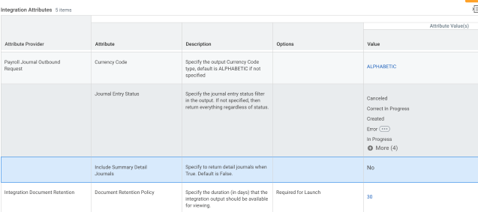
After: 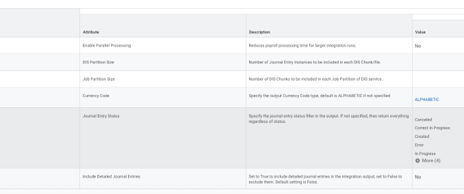
GoBD Template Enhancement to Include Asset Data
Workday® 2025 R2
What's New?
As part of the 2025R2 release, Workday has enhanced the GoBD Template integration by introducing a new Asset DIS integration service. This update allows you to include asset transaction data in a separate Asset.csv output file, supporting compliance with German tax regulations.
Key Changes:
- New Asset DIS integration service added to the GoBD Template.
- Generates a separate Asset.csv file containing asset data.
- All fields in Asset.csv are enabled by default.
- You can customize the output fields via the Configure Integration Field Attributes task.
Action Required:
- To include the asset data in the integration output, you must enable the new Asset DIS integration service.
- If no action is taken, the Asset.csv file will not be generated.
Setup Required: - Automatically Available
Before: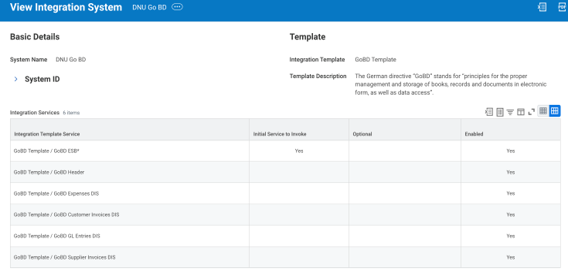
After: 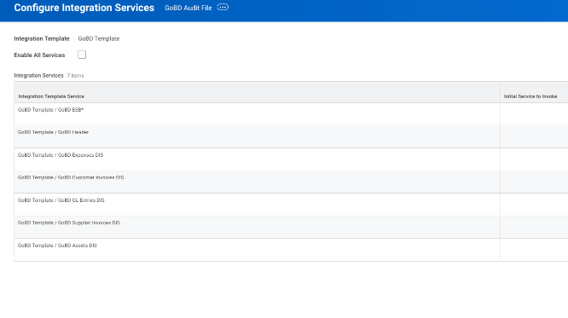
ADP Check Print Integration Workday® 2025 R2
What's New?
- DBA Name Field Expansion – The DBA (Doing Business As) Name field now supports up to 64 characters, allowing full legal company names to be entered without truncation.
- Alternate Address Overflow Lines – When the Alternate Address field exceeds its standard character limit, you cannot use three additional overflow lines (Line 1, Line 2, Line 3), each supporting up to 32 characters, to capture the remaining parts of long addresses. (Previously Only Line1 and Line 2 are there)
Impact?
- Data Accuracy: Full DBA names and longer addresses can now be printed correctly on checks, reducing truncation or abbreviation issues.
- Compliance: Ensures ADP specifications for check printing.
- Operational Efficiency: Minimizes mail delivery issues caused by incomplete address information.
Setup Required: - Automatically Available


Financial Integration Templates Improvements - Workday® 2025 R2
What's New?
- Workday updates how integration templates complete when they encounter errors, improving consistency and security The following changes have been introduced:
- Integration templates now complete with warnings when no inbound document is found instead of failing.
->Core Connector: Currency Rates
->Import ISO 20022 V1 Bank Fee Statements
-> Import ISO 20022 V2 Bank Fee Statements
- Integration templates now complete with warnings when no inbound document is found instead of failing.
Impact?
- These changes enhance consistency and strengthen security across financial integrations.
Setup Required: - Automatically Available
Learning REST Web Service - Workday® 2025 R2
What's New?
REST APIs
The content that you export, create, and update using the Learning v1 REST service is secured to these domains in the Learning functional area:
- Learning Access
- Manage: Learning Content
- Manage: Learning Course Enrollments
- Set Up: Learning Catalog
- Self-Service: Learning Instructor
- Self-Service: On the Job Training
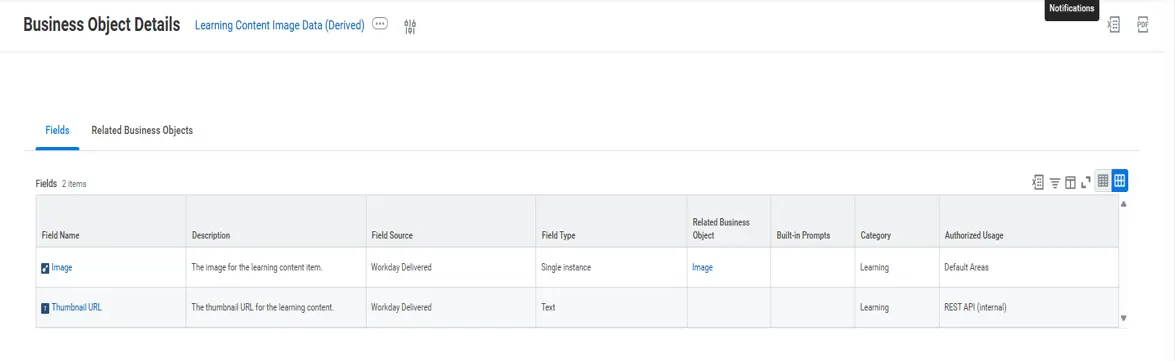
The learning content retrieved by the GET /content/{ID} endpoint includes programs, digital courses, blended courses, standalone lessons, course offerings, thumbnail images, and external content.
The course or course offering lessons retrieved by the GET /content/{ID}/lessons/{ID} endpoint include these lesson types: External content, media, survey, training activity, In Person Classroom (Instructor Led), and Virtual Classroom (Instructor Led). We also add a lesson context for each lesson type on blended and digital courses. For external content items, the lesson context will be unique for each URL.
The POST/manage Digital Courses endpoint enables the creation and updating of digital courses with an external link lesson from an external content provider platform to Workday Learning.
Example: Export a content catalog from Workday tenant to a third-party content provider platform.
User Interface
We add the new Opt into public content thumbnail image caching check box to the Edit Tenant Setup HCM task for you to allow Workday to host learning content image thumbnails on the public Internet.
Benefits
The Learning v1 web service bridges the gap between your learning content and your audience by providing robust integration capabilities with external Learning Management Systems (LMS) and Learning Experience Platforms (LXP). You can seamlessly synchronize your entire learning catalog, including thumbnail images and user permissions, ensuring your content is always up to date.
Impact
Workday won’t host learning content image thumbnails on the public Internet.
Change Log
Image Thumbnails
With this release, you can allow Workday to host learning content image thumbnails on the public Internet.
Setup Required: - Automatically Available
Manage Digital Courses REST API
We deliver a new Manage Digital Courses REST API, enabling applications to create and update digital courses with an external link lesson.
Setup Required: - Automatically Available
Content REST API
We deliver a new Content REST API, enabling applications to get information about course lessons and course offering lessons.
Setup Required: - Automatically Available
After Release 2-2025 (These new fields and Business Object are introduced)
Learning REST Web Service - Workday® 2025 R2
What's New?
- The Get Data section of the Edit Inbound EIB task now displays the Custom Object API version for EIBs that use the Custom Object Spreadsheet Template.
- When you edit a Custom Object EIB and switch the custom object used to a different one, Workday automatically updates the EIB to use the Custom Object API v2.0.
- When you generate a spreadsheet for a Custom Object EIB, the spreadsheet displays the Custom Object API version number next to the title.
- In the spreadsheets generated from EIBs using Custom Object v2.0 APIs, the new Action column cells now include a dropdown with Create, Update, and Delete options.
- The View Integration System report now displays the Custom Object API version number in the Template column.
- We add support for the existing Validate Only Load EIB option to Custom Object V2 EIBs.
- In EIB Custom Object v2.0 spreadsheets, each multi-instance item must be on a separate row, with the Spreadsheet Key repeated on each row. Records with comma-separated multi-instance items in a single cell are ignored.
Business Benefits
You can now create, update, and delete Custom Objects using EIB.
Impact
Your existing Custom Object EIBs (using the v1.0 APIs) do not change and will not be impacted. Note: Spreadsheets generated from EIBs using Custom Object v1.0 APIs are incompatible with EIBs using Custom Object v2.0 APIs, and vice versa. .
Setup Required: - Automatically Available


Skills Support on Cloud Connect for Learning Platform - Workday® 2025 R2
What’s New?
- You can import exact skills from content providers to Workday Learning using:
- Import External Vendor Skills check box.
- Using Configure Cloud Connect for Learning task.
- To disable synonymous skills matching,
- Select the Opt-Out of Synonymous Skills check box.
Benefits
- Enhanced Learning Recommendations: Learners will receive more relevant and personalized learning recommendations by Workday.
- Improved Career Development: The presence of skills on a wider range of content makes it easier for your learnersto identify and pursue learning opportunities that align with their career goals and drive their professional growth.
Impact
- Workday supports skills for the Cloud Connect for Learning platform.
- It enables third-party content providers to include their skills data when integrating with Workday Learning.
- This allows for a systematic mapping of the external skills to the Workday Skills Cloud.
Setup Required: - Automatically Available
Submit Request SOAP API - Workday® 2025 R2
What’s New?
- Workday delivers a new public Submit Request SOAP web service operation,
- Secured to the Request Business Process Type Security Policy in v45.0.
- You can use this operation to build an inbound Enterprise Interface Builder (EIB) integration that mass-creates requests in your Workday tenant.
- For more information, refer to the SOAP API Change Log link: https://doc.workday.com/admin-guide/en-us/integrations/workday-web-services-and-integration-ids/view-web-service-version-changes.html.
Benefits
- This feature makes it easier to create mass requests in Workday using an inbound EIB.
- It saves time and reduces manual data entry.
Impact
- Workday delivers a public web service operation for creating requests.
- You can use this web service operation to build an inbound Enterprise Interface Builder (EIB) integration.
- It mass-creates requests in Workday.
Setup Required: - Automatically Available


Version ISO 20022 pain.002.001.010 Support -Workday® 2025 R2
What's New?
- Support for ISO 20022 Version 10 (pain.002.001.010) in the Import Payment Status Report integration template.
- New integration attribute ISO20022Version = V10 to process version 10 payment statuses.
- Added schema validation to ensure incoming files comply with the ISO 20022 V10 standard.
Impact?
NA
Setup Required: - YES
Level of Effort:-


Remit –to Connection for EDI for supplier invoices - Workday® 2025 R2
What's New?
- Workday delivers a new Use Default Supplier Connection integration attribute, enabling you to use a default remit-to connection from a supplier.
- Workday now accepts a Supplier Connection Reference ID from the EDI 810 file as a remit-to connection.
- You can use this new functionality when using the EDI 810 integration system with these web services:
- Submit Supplier Invoice
- Submit Supplier Invoice Adjustment
Impact?
NA
Setup Required: - YES
Level of Effort:-
Before R2 Release:

After 2025R2: A New Attribute “Use Default Supplier Connection” has been added
Landed Cost Integration Attributes for EDI810 Supplier Invoices - Workday® 2025 R2
What's New?
- The Workday 2025 Release 2 introduces new options for managing freight and other charges on EDI 810 supplier invoices.
- Spend Category for Freight and Other Charges – Creates a zero-cost line on the supplier invoice with the configured spend category. Freight and other charges remain on the invoice header.
- Include Landed Costs in Tax – Option to include Freight and Other Charges in total tax calculation. Can also be seta's a default at the company level.
Impact?
- If the new attributes are not configured, EDI 810 files with freight amounts but no spend category will be created in Draft status, requiring manual submission for approval.
Setup Required: - YES
Level of Effort:-

Workday Bank Connectivity - Positive Pay Integration Template Workday® 2025 R2
What's New?
- Introduction of Workday Bank Connectivity – Positive Pay integration template.
- Available for transactions using the Workday Bank Connectivity Connector.
- Delivered as a prebuilt template instead of requiring custom Integration build.
- Only available to customers with the Workday Bank Connectivity SKU.
Impact?
- Efficiency: Eliminates need for custom integration builds and reduces maintenance.
- Standardization: Provides consistent and secure Positive Pay processing across banks.
- Faster Deployment: Speeds up implementation and testing with banking partners.
- Fraud Prevention: Ensures banks only issues checks that match Workday’s register.
Setup Required: - Yes
Level of Effort:-
UK International Assignments Workday® 2025 R2
What’s New?
- New Task
- Maintain UK International Assignment Worker Details
- Record residency status & related dates.
- New Report Fields
- EEA citizen indicator
- EPM6 (modified scheme) indicator
- Intention to live in UK for ≥183 days
- Intention to live in UK for <183 days
- Working both in/out of UK but living abroad
-
- Payroll & Reporting Changes
- Gender requirement checks in payroll tasks (only Male/Female allowed for HMRC).
- UK Payroll ID task:
- Defaults effective date from Start International Assignment.
- Adds “International Assignment” as a reason for creating ID.
- RTI FPS Updates:
- New data items (28–31A) for assignment & residency indicators.
- Items reported only in the first submission where they appear.
Benefits
- Ensures compliance with HMRC for internationally assigned workers.
- Improves accuracy of RTI FPS submissions.
- Reduces manual work by automating data capture for residency and assignment details.
- Prevents reporting errors that could lead to penalties.
Impact
- HMRC will not be adequately informed about:
- International assignment start
- International assignment end
- Risks:
- Non-compliance penalties
- Inaccurate payroll & tax submissions
- Payment delays for affected workers
Key Takeaways
- This update is mandatory for UK Payroll with international assignees.
- Action required to:
- Capture new data fields
- Adjust payroll & RTI submissions
- Ensure payment methods are UK-compliant
- Doing nothing = compliance risk + payroll errors.
What's Changing?
- New functionality to handle international assignments in UK Payroll.
- Designed to meet HMRC reporting requirements for such employees.
- Includes new tasks, new report fields, and updates to payroll calculations and RTI submissions.
Setup Required: - YES
Level of Effort:-


OAuth 2.0 Authentication for Custom SMTP Servers
Workday® 2025 R2
What’s New?
- In Create Email Configuration (Task):
- New SMTP OAuth Provider field.
- Currently supports only Microsoft Outlook.
Benefits
- Enhanced Security – OAuth 2.0 uses unique tokens instead of passwords.
- Revocable Access – Tokens can be revoked/reissued instantly if compromised.
- Industry Compliance – Meets modern security standards.
- Future Proof – Ensures continuity after Microsoft ends Basic Auth.
Impact
- After Microsoft stops Basic Authentication:
- Connection to Custom SMTP may fail.
- Emails may not be delivered or fallback to Workday default SMTP.
- Risk: Missed or delayed email notifications from Workday.
Key Takeaways
- Move to OAuth 2.0 is mandatory for Microsoft Outlook SMTP.
- Setup required before Microsoft deprecates Basic Auth.
- Benefits: Security, compliance, reliability.
- Action now = uninterrupted email delivery.
What's Changing?
- Workday now supports OAuth 2.0 authentication for Custom SMTP servers using Microsoft Outlook.
- Replaces Basic Authentication (username/password) with secure token-based authentication.
- Change aligns with Microsoft’s move to deprecate Basic Authentication.
- Applies to emails sent from Workday via your own SMTP server.
Setup Required: - YES
Level of Effort:-

PRISM
Enhanced Filtering for Data Change Activities -Workday® 2025 R2
What's New?
- On Data Catalog → Data Change Activity tab:
- New search & select filter for Target Tables.
- Can select one or multiple tables to refine activity list.
Benefits
- Faster performance – especially for large data volumes.
- No page timeouts – load only relevant activities.
- More efficient navigation.
Impact
- Improves user experience for anyone viewing large activity lists.
Key Takeaway
Filter by Target Tables before loading → quicker, stable, and more targeted results.
Setup Required: - Automatically Available
Prism Management Console – Activities Guardrail-Workday® 2025 R2
What's New?
- Row limit applied: Activities tab now displays max 5,000 rows.
- If selected View By time range exceeds 5,000 rows → validation message prompts to refine the range.
- No limit when viewing Last 24 hours.
Benefits
- Maintains report performance & reliability.
- Prevents large data requests that could slow down system.
Impact
- Users must refine time range to stay within row limit.
- Update training materials to reflect change.
Key Takeaway
New guardrail ensures faster, stable Prism Console performance by capping Activities tab at 5,000 rows.
Setup Required: - Automatically Available
SFTP Connections in Data Change Tasks-Workday® 2025 R2
What's New?
- Can now override directory & file pattern of an SFTP connection directly from a Data Change Task.
- Applies when creating or editing a task.
Benefits
- Reuse a single SFTP connection across multiple tasks.
- More control over which files are imported.
- Improved maintainability & reduced implementation time
Impact
- Existing tasks keep using their default directory & pattern unless overridden.
Key Takeaway
Flexible SFTP configuration → Less duplication, more efficiency in managing data change tasks.
Setup Required: - Automatically Available
Visual Representation of Stages in Datasets -Workday® 2025 R2
What's New?
- Transformation stages now shown in a pipeline view at the top of Edit Dataset Transformations.
- Replaces old side-panel list view.
- Stages are clickable for quick add, edit, debug, or delete.
Benefits
- Clear end-to-end view of dataset pipeline.
- Faster navigation & editing.
- Quick debugging of specific stages.
Impact
- Improves efficiency in building & maintaining datasets.
Key Takeaway
New pipeline view = More visual, faster, easier dataset management in Prism Analytics.
Setup Required: - Automatically Available
HCM
E-Verify Upgrades: Automated & Secure-Workday® 2025 R2
What's New?
- Workday automates E-Verify web service upgrades by securely storing your E-Verify Account ID and Integration ID, automatically sharing them when required. This eliminates manual surveys, ensures seamless compliance, and reduces admin effort
- This info gets stored securely in your tenant under E-Verify Account Details
Benefits
- Eliminates manual surveys → saves time and effort.
- Automated compliance → Workday directly handles mandatory E-Verify web service upgrades.
- Seamless integration → no disruption to ongoing Employment Verification processes.
- Data security ensured → Account ID & Integration ID stored as confidential tenant data.
Impact
- For HR/Admins: Less administrative overhead, no survey submissions required.
- For Business: Faster, more reliable compliance with E-Verify requirements.
- For IT/Systems: Reduces risk of errors or delays caused by missing survey responses.
- For Employees: No impact on their experience—verification continues smoothly.
Key Takeaway
- Workday now auto-shares your E-Verify Account ID & Integration ID during upgrades.
- The process is confidential, secure, and automatic.
- No action needed from customers—feature is automatically available in 2025R2.
- Ensures continuous, uninterrupted operation of E-Verify Employment Verification integration.
Setup Required: - Automatically Available

Initiate the Matrix Organization report from the Manager Insights Hub-Workday® 2025 R2
What's New?
Seamless Navigation from Hub to Matrix Organization
- Centralizes reporting by allowing matrix leaders to view organizational structures and reporting lines directly within the Manager Insights Hub.
- On the Performance Overview page in the Performance section of the Manager Insight Hub,
- we add: Awaiting Action - displays the 3 most recent calibration events awaiting action and a new Open
- Calibration button that you can use to view the specific calibration events.
Benefits
- Centralized Access – Launch the Matrix Organization report directly from the Manager Insights Hub.
- Time Efficiency – Reduces clicks and navigation effort for managers.
- Effective-Date Visibility – View organizational structures as of a specific date.
- Role-Based Security – Ensures only matrix leaders with proper access can view data.
Impact
- Simplifies navigation for matrix managers managing complex reporting structures.
- Enhances decision-making with instant visibility into reporting lines.
- Improves user adoption of the Manager Insights Hub by embedding a high-value report.
- Strengthens data security and compliance through domain-based access.
Key Takeaway
- This update empowers matrix leaders with faster, secure, and centralized access to organizational insights—right where they manage their teams.
Setup Required: - Automatically Available


Initiate the Matrix Organization report from the Manager Insights Hub-Workday® 2025 R2
What's New?
HCM Admin Hub that consolidates setup and configuration tasks for Workday HCM products in one centralized location.
Benefits
- Centralized access to all HCM setup and configuration tasks
- Improved navigation and reduced search time
- Promotes discovery of new tasks and features
- Enhances admin productivity with streamlined workflows
Impact
- Faster configuration and issue resolution
- Consistent and standardized setup across HCM domains
- Reduced dependency on multiple menus/pages
- Better visibility into new feature releases and resources
Key Takeaway
- The HCM Admin Hub simplifies administration by bringing all key HCM functions into one place, driving efficiency, accuracy, and smarter adoption of new features.
Setup Required: - Automatically Available


Prevent Out-of-Order Rescinding of ID Events Workday® 2025 R2
What's New?
- Workday now enforces rescinding ID events in sequence, from the latest to the earliest.
- This applies to:
- Edit Government ID
- Edit IDs
- Edit License
- Edit Other IDs
- Edit Passports and Visas
- New validations also block starting a new ID change when one is already in progress. The feature is automatically available in Release 2025R2
- Now it prevents out of order rescinding for all ID business processes, when they are standalone or when configured as a subprocess.
Benefits
- Ensures data accuracy by enforcing sequential rescinds.
- Prevents process errors and inconsistencies.
- Strengthens compliance and system integrity.
Impact
- Applies to all ID-related events (Government IDs, Licenses, Other IDs, Passports & Visas).
- Users can no longer rescind events out of order.
- Validations block new ID changes if one is already in progress.
- No configuration or action required — automatically available.
Key Takeaway
- Workday now enforces orderly rescinding of ID events, reducing errors and ensuring consistent, reliable data.
Setup Required: - Automatically Available
Filter on Worker History Events in Custom Reports -Workday® 2025 R2
What's New?
- Workday delivers a new report field that enables you to filter on worker history events and return a subset of them in custom reports.
- NEW FIELD: Worker History - Filterable
PURPOSE
- This new report field saves you time by no longer requiring you to create a Calculated Report Field when you want to return a subset of worker history events
- End Date and Start Date. You need to enter both dates for date filtering to work.
Benefits
- Eliminates the need for calculated fields to filter worker history.
- Provides flexible filters (date, workflow state, business process type).
- Improves report accuracy and usability for HR and managers.
- Saves time by quickly retrieving only relevant historical events.
Impact
- Streamlines reporting process across HCM.
- Reduces complexity for report developers and analysts.
- Ensures consistent access and visibility, secured by the correct domain.
- Enables faster decision-making with precise historical insights.
Key Takeaway
- The new Worker History – Filterable field makes custom reporting simpler, faster, and more accurate, empowering teams to focus on insights instead of building complex report logic.
Setup Required: - Setup Required


Prioritized Cybersecurity Codes -Workday® 2025 R2
What's New?
- You can now assign multiple cybersecurity codes and assign order of priority for those codes to filled positions and unfilled positions (position restrictions).
Benefits
- Enables assigning multiple cybersecurity codes to jobs and positions.
- Improves reporting and workforce analytics for cybersecurity roles.
- Ensures consistency by defaulting codes from position restrictions to filled jobs.
- Enhances visibility into cybersecurity priorities across the organization.
Impact
- Requires updating templates and optional fields setup.
- Existing data automatically converts to the new grid format (priority default = 1).
- New reporting fields and web service updates support analytics and integrations.
Key Takeaway
- Stronger, more detailed tracking of cybersecurity roles.
- Simplifies compliance and workforce planning.
- Smarter reporting with code priorities for better decision-making.
- Minimal disruption—old data carries over into the new structure.
Setup Required: - Setup Required

Workday Enables Multiple Jobs for Contingent Workers-Workday® 2025 R2
What's New?
- Workday now enables multiple jobs for contingent workers, giving organizations greater flexibility in managing their extended workforce.
- With new actions like Add Additional Job and End Additional Job, and enhancements to Change Job and Switch Primary Job, businesses can seamlessly hire, track, and manage contingent workers across multiple roles.
- This update delivers a consistent user experience, improves reporting accuracy, and enhances workforce agility, while also requiring careful consideration for systems like VNDLY, Recruiting, and Procurement that have limited multi-job support.
Benefits
- Reduces admin effort and costs.
- Improves headcount visibility and resource management.
- Provides consistent experience across employees and contingent workers
Impact
- Expands flexibility by allowing contingent workers to hold multiple jobs.
- Updates core business processes, event categories, and reporting for better accuracy.
Key Takeaway
- Workday simplifies contingent workforce management with multi-job support, boosting agility, accuracy, and efficiency.
Setup Required: - Setup Required


Job Architecture Hub - Manage and Analyze Job Profiles in One Place -Workday® 2025 R2
What's New?
- The Job Architecture Hub is a central workspace in Workday where you can manage and analyze all your job data in one place.
- It helps you organize job profiles, check for gaps or inconsistencies, and use skills insights to keep your job architecture accurate, consistent, and ready for future needs.
Benefits
- Centralized Management – Provides one unified hub to manage, monitor, and analyze job architecture data.
- Improved Reporting & Analytics – Enables reporting on job profiles, including impacts of updates or inactivation.
- Skills-Based Insights – Leverages skills analytics to compare supply vs. demand internally and with the market.
- Enhanced Career & Recruiting Outcomes – Delivers cleaner data for downstream machine learning use cases like Career Hub and Recruiting.
Impact
- Centralized Management – Provides one unified hub to manage, monitor, and analyze job architecture data.
- Improved Reporting & Analytics – Enables reporting on job profiles, including impacts of updates or inactivation.
- Skills-Based Insights – Leverages skills analytics to compare supply vs. demand internally and with the market.
- Enhanced Career & Recruiting Outcomes – Delivers cleaner data for downstream machine learning use cases like Career Hub and Recruiting.
Key Takeaway
- The Job Architecture Hub transforms job data management into a centralized, intelligent, and insight-driven process. It not only strengthens governance and data quality but also empowers HR leaders with actionable analytics to optimize workforce planning, skills alignment, and recruiting effectiveness.
Setup Required: - Setup Required
PAYROLL
AI Prompt Recommendations for Payroll Accounting – Workday® 2025 R2
What's New?
- Workday introduces AI-driven prompt recommendations in Payroll Accounting tasks. This feature suggests the most relevant prompts based on your frequent usage, reducing manual search time and streamlining payroll accounting activities.
Benefits
- Increases speed and efficiency in completing payroll accounting tasks.
- Improves accuracy by surfacing the most frequently used prompts.
- Reduces manual search effort for complex processes.
- Provides flexibility to enable or disable recommendations as needed.
New Functionality
- AI prompt recommendations are added to specific fields in these tasks:
- Assign Costing Allocations (Costing Company, Earning, Position Restriction, Worker)
- Create Payroll Accounting Adjustment (Change Reason, Employee)
- A new Recommended option displays up to 5 suggested prompts based on usage history.
- Administrators can disable these recommendations using the Maintain Machine Learning Prompt Recommendations task under the Payroll section.
Impact
- If no action is taken, Workday enables AI recommendations by default, and users will see suggested prompts when completing the above tasks. Administrators can choose to disable them if not required.
Key Takeaway
- Workday now streamlines Payroll Accounting with AI-driven recommendations, enabling faster, more accurate task completion while offering flexibility to customize preferences.
Setup Required: - Automatically Available
Current Accounting for Gross to Net Pay Results – Workday® 2025 R2
What's New?
- Workday introduces the ability to view all journal lines impacting a pay result in one place. This includes both the original transactions and any adjustments entered after the pay period was completed and processed, providing a consolidated view of gross-to-net pay results.
Benefits
- Eliminates manual, multi-step reporting.
- Provides a complete and immediate picture of all transactions impacting pay results.
- Consolidates original journal lines with subsequent adjustments into a single view.
- Improves accuracy and efficiency in payroll accounting review.
New Functionality
- A new Current Accounting tab is added to pay results, available in both legacy and composite views (configured on the Edit Tenant Setup – Payroll task).
- Displays all current accounting, including retro pay, payroll accounting adjustments, and reallocations.
- Journal types included: Actuals, Payroll Accounting Adjustments, Payroll Accrual Reallocation.
- Journal lines excluded: canceled lines, intercompany/interwork tag, reversing lines, and excluded retro actuals.
- Retro-related Payroll Accounting Adjustments display in the pay period where the PAA was processed.
- The Run Payroll Accounting Reallocation task also displays the Current Accounting tab.
A new Target Period Result column is introduced:
- Source Period: Original payroll result impacted by retro.
- Target Period: Payroll period where retro is paid or where changes exist.
Impact
- This feature provides a consolidated and transparent view of all accounting entries tied to a pay result, reducing reconciliation effort and improving visibility for payroll teams.
Key Takeaway
- Workday now delivers a comprehensive view of gross-to-net pay results, combining original and adjustment journal lines into one tab, streamlining reconciliation and reporting.
Setup Required: - Automatically Available
Run Off-Cycle Pay Calculation – Workday® 2025 R2
What's New?
- Workday improves the performance of off-cycle pay calculations, ensuring faster processing for payroll teams handling large worker volumes.
Benefits
- Increased speed when running off-cycle payroll calculations.
- Greater efficiency for payroll administrators.
- Improved scalability for processing large groups of workers.
New Functionality
- Enhancements made to the Run Off-Cycle Pay Calculation task.
- Payroll teams may notice faster performance when running calculations for a high number of workers.
Impact
- This update provides better processing efficiency for off-cycle calculations, reducing overall run times and improving payroll operations.
Key Takeaway
- Workday now delivers faster off-cycle pay calculation performance, helping payroll teams manage large worker volumes more efficiently.
Setup Required: - Automatically Available
AI Prompt Recommendations for Payroll Accounting – Workday® 2025 R2
What's New?
- Workday introduces AI-driven prompt recommendations in Payroll Accounting tasks. The system suggests relevant prompts based on frequent usage, making it easier for users to complete complex or repetitive payroll activities.
Benefits
- Speeds up task completion for payroll accounting.
- Improves accuracy by recommending the most frequently used values.
- Reduces manual search effort and navigation.
- Provides flexibility with an option to disable recommendations if not needed.
New Functionality
- AI prompt recommendations are added to the following tasks and fields:
- Assign Costing Allocations (Costing Company, Earning, Position Restriction, Worker)
- Create Payroll Accounting Adjustment (Change Reason, Employee)
- A new Recommended option suggests up to 5 prompts based on usage.
- Administrators can disable this functionality in the Maintain Machine Learning Prompt Recommendations task under Payroll.
Impact
- By default, Workday enables AI prompt recommendations for the listed tasks. If not disabled, users will automatically see suggested prompts when completing these fields.
Key Takeaway
- This feature enhances efficiency and accuracy in Payroll Accounting by surfacing relevant prompts automatically, reducing time spent searching and improving user productivity.
Setup Required: - Automatically Available
Rescinding Assigned Costing Allocations – Workday® 2025 R2
What's New?
- Workday updates the rules for rescinding assigned costing allocations, ensuring payroll results and accounting journals remain consistent and accurate.
Benefits
- Maintains accurate accounting records for payroll.
- Supports audit and compliance requirements by preventing changes to allocations tied to journals.
- Increases transparency and reliability of financial reporting.
New Functionality
- Workday now prevents rescinding assigned costing allocations that have already been used in accounting journals with a status of:
- Created
- Error
- Posted
- Assigned costing allocations can only be rescinded if they have not generated journal lines in accounting journals with these statuses.
Impact
- If you cannot rescind an existing costing allocation, you can still update it for future payroll processing by using the Assign Costing Allocation task, adjusting date ranges, and updating costing on the Existing Costing Allocations tab.
Key Takeaway
- This update protects accounting integrity by preventing rescinding of costing allocations already tied to payroll results, ensuring compliance and accurate reporting.
Setup Required: - Automatically Available
Costing Source for Payroll Accounting Journal Lines – Workday® 2025 R2
What's New?
- Workday introduces a new way to view the costing allocations that generated payroll accounting journal lines. This provides payroll teams with quick access to allocation details, eliminating the need for manual investigation through reports and configurations.
Benefits
- Provides immediate visibility into costing allocations tied to journal lines.
- Simplifies audits by enabling traceability of payroll accounting results.
- Reduces reliance on multiple reports or manual research.
- Improves efficiency and accuracy in payroll accounting reviews.
New Functionality
- A new View Costing Allocation page displays detailed allocation data behind journal lines, including:
- Intercompany (C2C) values if enabled in Maintain Payroll Accounting Options.
- Salary Over the Cap (SOC) values when applicable.
- Sub-allocation configurations for Salary Over the Cap.
- Dynamic worktag columns reflecting Maintain Worktag Usage configuration.
- Questionnaire details from the Assign Costing Allocation process (if configured).
- A new Costing Source field (secured to multiple journal line security domains) links directly to the View Costing Allocation page.
- Costing Source is available on these journal types:
- Actuals
- Current Accounting
- Forward Accruals
- Payroll Accrual Reallocation (preview only at this time).
Impact
- This feature enhances payroll accounting transparency by connecting journal lines directly to their costing allocations. Users with access to the appropriate security domains can immediately trace back allocation sources.
Key Takeaway
- Workday now provides direct visibility into the costing allocations that drive payroll accounting journal lines, improving auditability and reducing manual effort.
Setup Required: - Automatically Available
Shared Recoup Arrears Limit – Workday® 2025 R2
What's New?
- Workday introduces a new Shared Recoup Arrears Limit option that enables organizations to cap the total arrears recouped from employee deductions. This strengthens arrears recoup rules and supports compliance with mandates like the Oregon Family Leave Act.
Benefits
- Provides organizations with greater control over arrears recoupment.
- Prevents excessive arrears deductions from employee pay.
- Supports compliance with state and organizational mandates.
- Improves payroll accuracy and worker protections
New Functionality
- Administrators can configure shared recoup arrears limits using:
- Maintain Shared Recoup Arrears Limit
- Create Shared Recoup Arrears Limit
- Organizations can cap arrears recouped for a single deduction or across multiple deductions in a payroll result.
- The new step in the arrears recoup process ensures deductions do not exceed the defined limit.
- Deductions are grouped when:
- A worker has arrears across multiple deductions.
- The deductions share the same configured recoup arrears limit.
Impact
- If enabled, the shared recoup arrears limit ensures deductions do not exceed the set cap. Without setup, Workday continues using existing arrears recoup processes without applying this new limit.
Key Takeaway
- This feature enhances arrears management by allowing organizations to cap total arrears across deductions, improving compliance and preventing over-recoupment from employees’ pay.
Setup Required: - Setup Required
Configurable Payroll Access for Non-Payroll Users – Workday® 2025 R2
What's New?
- Workday introduces the ability to provide non-payroll users — such as HR, benefits, finance, and cost center managers — access to payroll data relevant to their role. This is managed through role-based, intersectional, or pay-component segment security configurations.
Benefits
- Improves efficiency by reducing manual effort to share payroll data across functions.
- Provides controlled access to payroll information while maintaining restrictions on sensitive data.
- Supports flexible access rules using organizational attributes such as business unit, cost center, region, or custom organizations.
New Functionality
- New security domains delivered under the Core Payroll functional area:
- Reports: Payroll Journal Lines by Organization & Pay Component – grants access to payroll accounting journal line data, with constraints by organization and pay component.
- Report: Worker Data: Payslips by Organization – enables non-payroll users to view payslips relevant to their organizational role without needing pay group access (only payroll users can print payslips).
- New Payroll Accounting by Organization & Pay Component report provides role-based access to payroll journal line data, filtered by organizational roles and segment-level pay components.
- Updated Payslips for Worker report allows non-payroll users to view payslip data based on role assignments.
- New Payroll Accounting Filter (by Accounting Date and Organization) report data source filter supports custom reports of journal line data by accounting date and organization.
Impact
- Non-payroll users such as HR, finance, or cost center managers can now securely access payroll data relevant to their roles. Without setup, payroll information remains restricted to payroll users only.
Key Takeaway
- This update allows organizations to securely extend payroll data access to non-payroll users, improving efficiency and collaboration while maintaining compliance and security.
Setup Required: - Setup Required
Payroll Input Custom Validations – Workday® 2025 R2
What's New?
- Workday introduces the ability to configure custom validations for payroll inputs. These validations improve data quality by preventing invalid payroll inputs from being created.
Benefits
- Improves data quality by enforcing validation rules at the point of entry.
- Prevents unauthorized or incorrect payroll inputs.
- Provides flexibility to configure validations based on pay components or user roles.
- Enhances payroll accuracy by stopping errors before processing.
New Functionality
- New Payroll Input section in the Maintain Custom Validations task.
- Administrators can create custom rules for payroll inputs (e.g., restrict by pay component or user).
- Introduces a new critical severity level: users cannot create payroll inputs that violate validation rules.
- Error message displays the text entered in the Description field (e.g., “You can’t create payroll inputs with this pay component”).
- Validations apply to these tasks:
- Add Payroll Input by Worker
- On-Demand Payments
- Manual Payments
- Supported in both the user interface and web services.
- Not supported for:
- History payments
- Worker worksheets
- Warning severity level (25R2).
Impact
- If configured, Workday enforces validations for payroll inputs. If not configured, Workday does not display or apply any validations, and payroll inputs can be created without restriction.
Key Takeaway
- This feature strengthens payroll accuracy and compliance by allowing organizations to configure custom rules that prevent invalid payroll inputs.
Setup Required: - Setup Required
Bank Account Verification for Payment Elections – Workday® 2025 R2
What's New?
- Workday introduces new verification screens for bank account changes in payment elections. This update strengthens payroll security by requiring validation whenever workers update account information or edit their payment elections.
Benefits
- Strengthens payroll security by preventing unauthorized account changes.
- Reduces fraud risk from phishing or incorrect entries.
- Provides configurable maximum attempts for verification.
- Enhances user clarity with customizable lockout help text.
New Functionality
- Verification screens added to the Change Account Information and Edit Payment Elections tasks.
- The system validates account numbers and displays “Incorrect Account Number” with attempts remaining.
- Default maximum attempts = 6 (can be overridden in the Edit Tenant Setup – Financials task).
- Locked-out users can be reset through the new Unlock Payment Election Access task (secured by the Manage: Unlock Payment Election Access domain).
- Approver rejections or send-backs automatically unlock access.
- Lockout help text can be customized using the Maintain Payment Elections Help Text task.
Impact
- Organizations gain tighter control over payroll account updates, ensuring workers must provide valid bank details before changes are saved. Without this setup, Workday continues to allow edits without account verification.
Key Takeaway
- This feature improves payroll security by requiring verified bank account details for payment elections, reducing fraud risks and ensuring compliance.
Setup Required: - Setup Required
Salary Over the Cap – Evaluate 0% Full-Time Equivalent as 100% – Workday® 2025 R2
What's New?
- Workday introduces the ability to treat workers with 0% FTE (or blank FTE) as 100% FTE, ensuring their earnings are included in the Salary Over the Cap calculation.
Benefits
- Ensures workers with 0% or blank FTE are included in Salary Over the Cap calculations.
- Aligns costing by treating these workers’ earnings as under-the-cap commitments.
- Supports compliance and consistency in grant accounting.
New Functionality
- A new checkbox Salary Over the Cap – Evaluate 0% FTE as 100% is added to the Grants/Awards section of the Maintain Payroll Accounting Options task.
- Selecting this checkbox ensures that earnings of workers with 0% or blank FTE are included in Salary Over the Cap calculations and costed to the under-the-cap grant.
- Payroll commitments process these workers’ earnings as under-the-cap commitments.
- Updated web service operations in v45.0:
- Get Payroll Accounting Options
- Put Payroll Accounting Options
(See the SOAP API Change Log under Related Information).
Impact
- If enabled, Workday treats workers with 0% or blank FTE as 100% in Salary Over the Cap calculations. If not enabled, their earnings continue to be treated as over-the-cap. Payroll results already in progress require recalculation after enabling the feature.
Key Takeaway
- This feature improves Salary Over the Cap processing by ensuring that workers with 0% or blank FTE are properly included in grant costing as under-the-cap.
Setup Required: - Setup Required
Assign Costing Allocation Questionnaire – Workday® 2025 R2
What's New?
- Workday introduces the ability to add a questionnaire to the Assign Costing Allocation business process, allowing organizations to capture additional details when allocations fall outside expected date ranges.
Benefits
- Ensures transparency and justification for costing allocations.
- Provides administrators with clear documentation for exceptions.
- Strengthens audit and compliance controls.
- Improves accountability in payroll accounting processes.
New Functionality
- A configurable questionnaire can now be added as a step in the Assign Costing Allocation business process (secured to the Core Payroll functional area).
- A new Costing Allocation Submission Date report field (secured to the Public Reporting Items domain) enables making the questionnaire a required step if the submission date is greater than a specified number of days from the costing allocation’s start date.
- Payroll administrators can view questionnaire responses in the Event Details section of the Assign Costing Allocation event once complete.
Impact
Payroll teams can now configure questionnaires to ensure explanations are provided for allocations submitted outside approved timeframes, adding rigor to compliance and review processes.
Key Takeaway
- This feature improves governance and accountability in payroll costing by requiring explanations for late or unusual allocations through configurable questionnaires.
Setup Required: - Setup Required
Bottom-Up Headcount Planning: Refresh Plans from Actuals – Workday® 2025 R2
What's New?
- You can now refresh HCM actuals directly into bottom-up headcount and forecast plans.
- A new Refresh Actuals button is available in Headcount Planning Event My Tasks, routed to plan controllers.
Benefits
- Keeps plans in sync with HCM actuals at the time of approval.
- Reduces reconciliation issues between planned and actual workforce data.
- Provides visibility into positions impacted by actuals updates.
Impact
- Refresh relies on actuals available from the Workforce Planning Configuration Manager.
- New actuals must exist since the plan was created.
- In some cases, you may need to wait for the next scheduled refresh before merging.
Key Takeaway
- Refresh Actuals button to merge HCM data into headcount and forecast plans.
- Status text above grids shows when actuals were last refreshed.
- Icons per position row indicate if a position:
- Is new (from HCM merge)
- Was changed by an HCM merge
- Has effective-dated changes
- Drill-through modal: Clicking an icon displays:
- Current values
- Planned changes (with highlighted differences)
Setup Required: - Automatically Available
Separate Payments for Supplier Invoices – Workday® 2025 R2
What's New?
- Enables issuing separate payments for individual supplier invoices during a settlement run.
- Provides greater flexibility in managing how payments are grouped, reducing reliance on manual ad hoc processes.
- New Separate Payment Check Box on supplier invoices:
- Each selected invoice generates its own payment line within a payment group.
- Availability:
- Editable on: Create/Edit/Revise Supplier Invoice, Change Approved Invoice, Copy, Recurring, Down Payment, From PO/Receipt/Request/Contract Schedule.
- Read-only on: Approve, Preview, Review, View Recurring/Down Payment/Supplier Invoice.
- Supplier Defaults:
- When Always Separate Payments is enabled, the field is auto-selected and locked on invoices.
Benefits
- Increased control over payment grouping within settlement runs.
- Eliminates manual effort for creating separate ad hoc payments.
- Reduces need for multiple supplier remit-to connections.
- Reporting enhancements with new secured fields:
- Separate Payment for Recurring Supplier Invoice
- Separate Payment for Supplier Invoice Schedule
- Separate Payments (Supplier Invoice Document)
- Web Services (v45.0) updated to include the Separate Payment field across operations such as Bulk Import, Import Supplier Invoice, Submit Supplier Invoice, Put Supplier Invoice Text Only, etc.
Impact
- Refresh relies on actuals available from the Workforce Planning Configuration Manager.
- New actuals must exist since the plan was created.
- In some cases, you may need to wait for the next scheduled refresh before merging.
Key Takeaway
Gives organizations finer control over how supplier invoices are paid—removing manual workarounds and ensuring flexible settlement processing.
Setup Required: - Automatically Available
Workday Assistant for Adaptive Planning – Workday® 2025 R2
What's New?
- AI-powered interface to interact with Adaptive Planning using natural language.
- Contextual Help: conversational access to Adaptive Planning documentation and guidance.
- Provides contextual “how-to” information for tasks such as:
- Setting up alternate calendars
- Creating Machine Learning (ML) forecasts
- Reviewing scenario changes
- Changing default currencies
Benefits
- Faster, more strategic decisions with AI-driven insights and next-step suggestions.
- Boosts productivity and user adoption with intuitive, conversational planning.
- Streamlines access to Adaptive Planning knowledge through contextual analysis and smart search.
- Reduces dependency on support teams by offering seamless, in-app guidance.
Impact
- Administrators can enable the Assistant, making it available globally via the sparkle icon.
- End users gain instant, context-aware help without leaving workflows.
Key Takeaway
- The Workday Assistant makes Adaptive Planning smarter, conversational, and more accessible—empowering both admins and end users to plan faster and smarter.
Setup Required: - Setup Required
Version-Specific Overrides for Linked Accounts – Workday® 2025 R2
What's New?
- Version-specific overrides for linked accounts are now generally available.
- Administrators can enable linked accounts for data entry in specific plan versions.
Benefits
- Flexibility to use links in some plan versions while enabling data entry in others.
- Supports multiple data entry methods:
- Manual entry in sheets
- Data imports
- Predictive Forecaster
- Reduces the need for additional cube sheets by allowing past budgets to be loaded directly into GL account structures.
- Retains historical plan version data when switching between links and data entry.
Impact
- Provides more control over modeling by allowing overrides at the version level.
- Helps organizations transition between link-driven structures and input-driven budgets without losing data.
Key Takeaway
- Link Filters:
- Override links for specific version (check box to activate override fields)
- Link Version Selector (choose plan version)
- Override Link Setting (None = keep link, Data Entry = allow imports/input)
- Supported data access:
- Sheets
- Manual imports
- Design Integrations loaders (GL & Custom accounts)
Setup Required: - Setup Required
Multicurrency Support for Supplier Bank Accounts – Workday® 2025 R2
What's New?
- Introduced a new Accepted Currencies prompt on supplier settlement bank accounts.
- Enables defining which currencies a bank account can receive for electronic payments, reducing payment errors and improving control.
Benefits
- Routes payments to the correct bank account by payment type and currency.
- Reduces risk of payment failures due to unsupported currencies.
- Improves auditability through supplier change history tracking.
Impact
- Plan to update supplier bank accounts with accepted currencies, configure custom validations if needed, and test payment routing across invoices and ad hoc payments.
Key Takeaway
- Accepted Currencies Prompt:
- Leave blank: account accepts all supplier currencies.
- Select subset: restrict account to those currencies only.
- Change Tracking:
- Updates appear on supplier change history and reports.
- Suppliers can maintain currencies via the Supplier Portal.
- Validations:
- Unique bank accounts can now be configured by payment type + currency.
- Supports multiple accounts with same payment type (no overlapping currencies).
- Extended Access:
- Prompt added to tasks: Change Supplier Settlement Bank Account, Edit Supplier Change, Review Supplier Change, Revise Supplier Change, and others.
- Visible on Ad Hoc Payments settlement bank accounts.
- Processing Logic Updates:
- Default Currency on Remit-To Connections: auto-populated, override possible.
- Settle Supplier Invoices: logic uses both payment type + currency, else payment exception.
- Ad Hoc Payments: routing logic updated to consider both payment type and currency.
- Custom Reports & Validations:
- New secured fields:
- Remit-To Connection Accepted Currencies
- Settlement Bank Account Accepted Currencies
- Web Services (v45.0):
- Enhanced to support accepted currencies across supplier and remit-to connection operations.
Setup Required: - Setup Required
TALENT & PERFORMANCE
Flex Teams Report Navigation-Workday® 2025 R2
What's New?
- With this release, Workday renames the Flex Teams report to Manage Flex Teams.
- When this report is empty, it now displays a link to find flex team opportunities.
Benefits
- Navigation to Flex Teams functionality is easier and more intuitive for administrators, hosts, and workers.
- Flex team hosts benefit from clearer report naming, and workers who navigate to this page receive guidance to find flex team opportunities instead.
Impact
- NA
Key Takeaway
Improves User Experience.
Setup Required: - Automatically Available
Suggested Skills on Worker Profile and Internal Apply -Workday® 2025 R2
What's New?
- Now we have AI inferred suggestions displayed on the worker profile and in Career Hub onboarding.
- Suggestion ordering logic displayed in the Edit Skills task on the worker profile.
Benefits
- Creates a unified experience for workers interacting with skill suggestions across the worker profile, internal job applications, and Career Hub onboarding.
- Improved skill suggestion ordering in the Internal Apply feature.
Impact
- NA
Key Takeaway
- AI Generated skill sets available.
Setup Required: - Automatically Available
Suggested Skills on Worker Profile and Internal Apply -Workday® 2025 R2
What's New?
- Workday expands Machine Learning feature. Suggested Skills for Worker Profile as a skill source in the new Suggested Skills section of the task based on their job profile.
Note: You can't remove skills that you add through this task using a mass action.
Benefits
- Creates a unified experience for workers interacting with skill suggestions across the worker profile, internal job applications, and Career Hub onboarding.
- Improved skill suggestion ordering in the Internal Apply feature.
Impact
- NA
Key Takeaway
- AI Generated skill sets available.
Setup Required: - Automatically Available
Give Requested Feedback in My Tasks -Workday® 2025 R2
What's New?
- Enhancement in “Give Requested Feedback” in My Tasks.
- The overview with a Feedback Request Details section and direct the feedback provider to a full page.
Benefits
- Empowers workers by providing greater transparency and displays the necessary information for Give Requested Feedback events.
Impact
- NA
Key Takeaway
- Improved design allows feedback providers to manage and respond to feedback requests more efficiently.
Setup Required: - Automatically Available
Flex Team Hosts as Performance Review Additional Managers -Workday® 2025 R2
What's New?
- Performance reviews can include workers’ flex team hosts as additional managers.
- Flex teams integrate more closely with performance reviews, helping workers receive recognition for their contributions and development during flex team assignments.
Benefits
- Managers have a more complete view of their teams’ performance,
Impact
- NA
Key Takeaway
- Improved Workflow.
Setup Required: - Setup Required

Flex Teams Support Contingent Workers -Workday® 2025 R2
What's New?
- Workday extends access to Flex Teams to contingent workers.
- Need to set up Workday to enable contingent workers as flex team workers and hosts, and to surface suggested flex teams to contingent workers in Opportunity Marketplace.
Benefits
- Workday provides this functionality as a configuration option for use at your discretion.
Impact
- NA
Key Takeaway
- This functionality empowers contingent workers with more opportunities to contribute to your organization.
Setup Required: - Setup Required
TIME TRACKING AND ABSENCE
Display Scheduling Data on the Edit and Approve Time Report-Workday® 2025 R2
What's New?
- View scheduled hours alongside reported time in the Edit and Approve Time report
- New Customize View button allows toggling scheduling data
- Time Approval Templates now include Don't Display Scheduling Data checkbox
- New labels: Hours → Hours Worked
Benefits
- This provides managers and administrators with greater context for time review and approval by displaying scheduled versus actual reported times in a single view, improving efficiency and accuracy.
- This provides managers and administrators with greater context for time review and approval by displaying scheduled versus actual reported times in a single view, improving efficiency and accuracy.
Impact
- Interface change
- Control visibility via Time Approval and Time Entry Templates
Key Takeaway
- Use the new HCM Admin Hub to simplify and streamline administrator workflows across all HCM modules—no extra setup needed.
Setup Required: - Automatically Available
HCM Admin Hub-Workday® 2025 R2
What's New?
- New HCM Admin Hub centralizes access to configuration tasks across:
- Core HCM, Recruiting, Compensation, Benefits, Absence, Time Tracking, Scheduling
- Includes access to: Job Architecture Hub, Admin Guides, and Latest Feature Releases
- Dedicated pages for each functional area (e.g., Job Catalog, Time Entry, Career Sites, etc.)
- Fully configurable via Maintain Hubs task
Benefits
- The HCM Admin Hub improves the findability of tasks and reports, while also promoting the discovery of new tasks and reports. It also enables administrators to more easily navigate between configuration tasks.
Impact
- No setup required unless customizing layout or navigation
- Access controlled by existing domain security permissions
Key Takeaway
- Use the new scheduling data display to give managers deeper insight during approvals—improving decision-making and saving time.
Setup Required: - Automatically Available
Managers Insight Hub - Time & Scheduling-Workday® 2025 R2
What's New?
- Expanded Time, Scheduling, and Absence actions now integrated into Manager Insights Hub
- Renamed sections: Time Management → Time & Scheduling
- Overview page updated with new layout and subsections
- Added new tasks, reports, and cards for better organization and insight
Benefits
- This continues to consolidate critical time, scheduling, and absence tasks and reports into one central location, enabling managers to more easily support their team.
- This continues to consolidate critical time, scheduling, and absence tasks and reports into one central location, enabling managers to more easily support their team.
Impact
- Existing users must apply new updates manually to the Time & Scheduling Overview page
- Controlled by existing manager domain security permissions
Key Takeaway
- Enhance the Manager Insights Hub with powerful time, scheduling, and absence insights—improving team management from one centralized location.
Setup Required: - Automatically Available
Enter Time by Period-Workday® 2025 R2
What's New?
- On Time Entry: "Enter Time by Period" feature update.
- Workers and managers can now use only the period calendar for time entry via a new "Period Only" option on templates.
- Integrated help text appears directly under summary totals (if configured).
- New PDF print icon enables quick download of the visible calendar range.
- UI streamlined: "Switch Calendar" option is removed when "Period Only" is selected.
Benefits
- simplifies the time entry experience for workers and managers with a more intuitive interface, direct access to relevant instructional help text, and the ability to print the calendar for a period.
- simplifies the time entry experience for workers and managers with a more intuitive interface, direct access to relevant instructional help text, and the ability to print the calendar for a period.
Impact
- Improves usability and clarity for teams entering time by period.
- Reduces confusion by eliminating unnecessary calendar toggles.
- Enhances support with contextual guidance and export functionality.
Key Takeaway
- Enable the "Period Only" calendar view to deliver a streamlined, supportive, and printable time entry experience for your workforce.
Setup Required: - Setup Required
Enter Time by Type (New!)-Workday® 2025 R2
What's New?
- Enter Time by Type (New!) – A configurable project time entry task with a grid interface.
- New web service: Put Reported Time Blocks for Worker.
- Enhanced search, bookmarking, and editing capabilities.
- Task enabled via Edit Time Entry Template/Create Time Entry Template setup.
Benefits
- The new Enter Time by Type (New!) task enables project workers to quickly and efficiently enter their time in an easy-to-use grid that can be organized by time types. This increases worker productivity and improves the user experience through enhanced search, bookmarks, and intuitive editing capabilities that support rapid time entry.
Impact
- Requires setup and configuration (new checkbox in template).
- Time entry simplified via keyboard navigation, copy/paste, and real-time calculations.
- Supports robust validation and error handling.
- Enhances visibility into project time details.
Key Takeaway
- Enter Time by Type (New!) modernizes time entry with a grid-based, user-friendly experience—boosting efficiency, accuracy, and usability for project workers.
Setup Required: - Setup Required
Configuration Options for Edit and Approve Time -Workday® 2025 R2
What's New?
- New checkboxes added to time approval templates:
- Collapse Top Summary Cards
- Disable Autofill
- Enhanced configuration of the Edit and Approve Time report UI
Benefits
- This enables you to tailor the Edit and Approve Time experience with a standardized time correction method and a view that reduces initial visual clutter, enabling managers to focus on relevant sections immediately.
Impact
- Interface change
- Setup required to apply new options
- No change if no action is taken
Key Takeaway
- Update your Time Approval Templates to take advantage of new configuration controls that streamline manager workflows and improve clarity.
Setup Required: - Setup Required
Configuration Options for Edit and Approve Time -Workday® 2025 R2
What's New?
New Settings in Time Approval Templates:
- Collapse Top Summary Cards
- Disable Autofill
- Hide All Current Time in Time Entry Approval (My Tasks)
Benefits
- This update provides greater control over the visibility of worker time entries during the approval process. You can now better protect worker privacy and ensure time approvers only see the information relevant to their specific approval tasks.
- This update provides greater control over the visibility of worker time entries during the approval process. You can now better protect worker privacy and ensure time approvers only see the information relevant to their specific approval tasks.
Impact
- Setup Required to enable new options
- Interface change—no effect unless configured
- Improves clarity and data control during approvals
Key Takeaway
- Review and update Time Approval and Time Entry Templates to apply new visibility and layout options that enhance efficiency and privacy during time approvals.
Setup Required: - Setup Required
Configuration Options for Edit and Approve Time -Workday® 2025 R2
What's New?
- New Time Management Hub
- Centralized access to tasks like:
- Request Absence
- Enter My Time
- Check In/Out
- View Schedules etc.
- Customizable Overview page and navigation via Maintain Hubs
Benefits
- This update improves the user experience for workers by consolidating time management tasks and reports in one central location on both mobile and desktop. This prioritizes relevant tasks, and reduces the time and effort required to manage absences, time entries, and schedules.
Impact
- Setup Required: Configure domain access & hub content
- Security: Access controlled via Self-Service: Time Management Hub domain
- Existing worklets should be removed if hub is enabled
Key Takeaway
- Review and update Time Approval and Time Entry Templates to apply new visibility and layout options that enhance efficiency and privacy during time approvals.
Setup Required: - Setup Required
Flexible Check-In and Check-Out-Workday® 2025 R2
What's New?
- Configure thresholds (0–120 mins) before/after check-in and check-out
- Workers can edit check-in/out times within defined windows on desktop and mobile
- New section added to Time Entry Templates:
- In/Out Time, Break, Meal, and threshold settings
- Enhanced reporting
Benefits
- This enables workers to record their hours with precision, even when there are delays between arriving at work and checking in or between checking out and leaving. You will now have the data you need to pay employees for all their worked time so that you can meet compliance requirements. This feature also saves time for managers and administrators who no longer have to make adjustments.
Impact
- Interface Change
- Setup Required via Time Entry Templates and Tenant Setup
- Does not apply to shift-based check-ins or geofencing by shift location
Key Takeaway
- Enable Flexible Check-In/Check-Out to give workers editing flexibility, improve accuracy, and streamline time tracking across desktop and mobile.
Setup Required: - Setup Required
Calculated Time Offs Crossing Midnight -Workday® 2025 R2
What's New?
- Time offs that cross midnight can now create calculated time blocks
- Calculated time offs now work like calculated time blocks
- New configuration in Time Entry Templates to enable this behavior
- Support added across multiple time entry methods (e.g., Enter Time by Week, HVTE)
Benefits
- This enables workers to record their hours with precision, even when there are delays between arriving at work and checking in or between checking out and leaving. You will now have the data you need to pay employees for all their worked time so that you can meet compliance requirements. This feature also saves time for managers and administrators who no longer have to make adjustments.
Impact
- Setup Required: Enable calculated time offs and assign calculation tags
- Applies only if configured; no change otherwise
- Known issues exist in Edit and Approve Time (EAT) for some edge cases
Key Takeaway
- Enable Calculated Time Offs Crossing Midnight to accurately apply shift-based calculations, enhance compliance, and automate premium time off pay handling.
Setup Required: - Setup Required
REPORTING / SECURITY
HCM Admin Hub – Workday® 2025 R2
What's New?
- New centralized HCM Admin Hub for setup and configuration tasks.
- Consolidates Core HCM, Recruiting, Compensation, Benefits, Absence, Time Tracking, and Scheduling in one location.
- Direct access to Job Architecture Hub, HCM Admin Guide, and latest feature releases.
Benefits
- Easier navigation across setup and configuration tasks.
- Improved findability and discovery of tasks and reports.
- Centralized access promotes efficiency for administrators.
Impact
- Simplifies administrator experience with a single hub.
- Enhances productivity by reducing time spent searching.
Key Takeaway
- The HCM Admin Hub brings all key HCM configuration and setup tasks into a single centralized location — making it easier for administrators to navigate and manage Workday HCM.
Setup Required: - Automatically Available

Managers Insight Hub – Time & Scheduling Workday® 2025 R2
What's New?
- Enhanced Manager Insights Hub with additional time tracking, scheduling, and absence tasks/reports.
- Renamed Time Management section to Time & Scheduling, with new subsections and pages.
- New buttons for key actions (e.g., Request Absence, Enter Time, Assign Shift Profiles).
- New cards introduced under Recommended for You, My Team Today, and Needs Review.
- New pages: Edit and Approve Time, Review and Approve Time.
Benefits
- Centralized access to time, scheduling, and absence actions and insights.
- Easier support for teams through improved navigation and organization.
- More tailored manager experience with role-based security on tasks/reports.
Impact
- Streamlines manager workflows by consolidating critical tasks in one hub.
- Reduces duplication across hubs while keeping Time & Scheduling Hub still available.
Key Takeaway
- The Manager Insights Hub now provides expanded time, scheduling, and absence capabilities in one place — making iteasier for managers to support their teams with greater efficiency
Setup Required: - Automatically Available

Maintain Field Lists – Workday® 2025 R2
What's New?
- Renamed Maintain Field Lists for Discovery Boards task to Maintain Field Lists for Reporting.
- New Product Area prompt (Discovery Boards or Report Writer).
- Ability to create a curated list of most used fields for Advanced and Matrix reports.
Benefits
- Faster report creation with curated field lists.
- Simplifies navigation by centralizing field list maintenance.
- Reduces time spent searching through large sets of fields.
Impact
- Improves reporting efficiency and user experience.
- Streamlines access to relevant fields across Discovery Boards and Report Writer.
Key Takeaway
- The Maintain Field Lists task is enhanced to support curated field lists for Advanced and Matrix reports, helping users work faster and more efficiently.
Setup Required: - Automatically Available


Central Place for Managing Reporting Models – Workday® 2025 R2
What's New?
- New Manage Reporting Models page for centralized model management.
- Ability to set default models, create, edit, copy, or delete reporting models.
- View individual model health and metrics from one location.
Benefits
- Keeps users informed on reporting model status.
- Enables quick action to manage and maintain models.
- Centralized control improves efficiency and oversight.
Impact
- Simplifies reporting model administration with a single hub.
- Reduces effort in monitoring and maintaining reporting models.
Key Takeaway
- The new Manage Reporting Models page centralizes model health monitoring and management, streamlining reporting administration for users.
Setup Required: - Automatically Available


Waterfall Chart in Report Writer – Workday® 2025 R2
What's New?
- New Waterfall chart visualization available in Report Writer for Matrix and Trending reports.
- Enhanced configuration options including Fill Patterns toggle and improved axis/metric selections.
- Tooltip improvements with drillable fields, hyperlinks to drill tables, and drill menus.
- Improved chart rendering with legends for Start, Increase, Decrease, and Total.
Benefits
- Provides clear insights into positive and negative contributions to a final value.
- Supports better understanding of financial statements, inventory changes, and project progress.
- More intuitive and powerful reporting experience with enhanced tooltips and rendering.
Impact
- Expands reporting capabilities with a new visualization type.
- Enables analysts and managers to more easily interpret sequential changes in data.
Key Takeaway
- The new Waterfall chart option in Report Writer enhances data analysis by showing the cumulative effect of increases and decreases, delivering clearer insights into business performance.
Setup Required: - Automatically Available


Analytics and Reporting Hub – Workday® 2025 R2
What's New?
- New Analytics and Reporting Hub providing a centralized workspace for reporting-related tasks, reports, and processes.
- Includes Worksheets, Discovery Boards, Prism, and Office Connect tasks.
- Copy Standard Report to Custom Report task added for easier access.
- Recently Updated Calculated Fields now configurable via button.
- Removed duplicate/slow reports for better performance.
- Top 10 Most Run Reports card now excludes deleted reports.
- Maintain Field Lists for Reporting task moved to a button.
- Added 3 new overview pages: Security, Business Form Layout, Reporting Object.
Benefits
- Centralized access reduces time searching for reporting features.
- Streamlined navigation improves productivity for report authors and administrators.
- Helps discover new Workday reporting features and best practices.
- Simplifies administrative and housekeeping tasks for analytics.
Impact
- Enhances reporting experience by consolidating tools and processes.
- Improves accuracy, efficiency, and discoverability of reporting resources.
Key Takeaway
- The Analytics and Reporting Hub centralizes reporting and analytics tasks in one workspace, boosting productivity and simplifying access for report authors and administrators.
Setup Required: - Automatically Available


Trended Workers Data Source – Workday® 2025 R2
What's New?
- Expanded Trended Workers data source to return data for up to 72 months (6 years) instead of the default 36 months.
- Added new Number of Periods field on Maintain Trended Workers task (min 12 months, max 72 months).
- Updated Trended Turnover Summary report and multiple workforce reports to support 72 months.
- Delivered new report fields for Month and Quarter start dates (up to 72 months / 23 quarters ago).
Benefits
- Provides extended historical data for workforce planning and trend analysis.
- Enables richer insights into turnover, compensation, headcount, and workforce trends.
- Reduces limitations of previous 3-year window for strategic reporting.
Impact
- All reports using the Trended Workers data source now support up to 72 months.
- Existing custom reports must be updated if they rely on old report fields.
- UI text and hover descriptions updated for clarity.
Key Takeaway
- With expanded trended worker reporting up to 72 months, Workday enables deeper workforce analysis and long-termplanning across key HR and financial metrics.
Setup Required: - Setup Required
Trended Workers Data Source – Workday® 2025 R2
What's New?
- Contingent workers can now hold multiple jobs.
- New business process actions: Add Job for Contingent Worker and End Job for Contingent Worker.
- Updates to Change Job and Switch Primary Job to support contingent workers with multiple jobs.
- New setup options in Edit Tenant Setup – HCM and event categories for contingent worker jobs.
- Web services updated (v45.0) to support multiple jobs: Add, Import, Get, and End Additional Job.
- Reporting enhancements to reflect multiple contingent worker jobs.
Benefits
- Provides a consistent experience for hiring and managing contingent workers.
- Improves resource management, headcount reporting, and operational efficiency.
- Reduces administrative effort and costs while increasing workforce agility.
Impact
- Existing business processes updated to support additional contingent worker jobs.
- Customers using Workday VNDLY Workforce Connector should not uptake this feature until supported to avoid data issues.
- Workday Recruiting and Procurement have limitations with multiple jobs for contingent workers.
Key Takeaway
- Workday now supports multiple jobs for contingent workers, simplifying extended workforce management while improving visibility and efficiency, though some integrations require future updates.
Setup Required: - Setup Required


Dynamic Display By Option for Composite Reporting – Workday® 2025 R2
What's New?
- Composite reporting now supports dynamic display fields for repeating column groups.
- When selecting a Company or Company Hierarchy on the report prompt, repeating columns render dynamically based on the prompt.
- New Field option added to the Lookup Hierarchy calculated field for composite reporting.
- New Top Level Company Hierarchy report field delivered (secured to Public Reporting Items domain).
- Calculated fields with the new option can be migrated using OX 2.0.
Benefits
- Eliminates the need to create duplicate composite reports for each company hierarchy.
- Simplifies report development and reduces maintenance time.
- Provides more flexible, user-driven reporting experiences.
Impact
- NA
Key Takeaway
- Composite reports can now dynamically adapt to the selected Company or Company Hierarchy, making reporting more efficient, flexible, and scalable.
Setup Required: - Setup Required
Dynamic Display By Option for Composite Reporting – Workday® 2025 R2
What's New?
- OfficeConnect for Financial Management now supports up to 3 different reporting models.
- Domain and task renamed:
- Set Up Financial Reporting and Analytics Data Model → Set Up Reporting Model
- Set Up Financial Reporting and Analytics Data Model task → Set Up Reporting Model task
- New admin tasks: Copy Reporting Model and Delete Reporting Model.
- Existing Clear Financial Reporting Caches task enhanced to clear specific or all model caches.
- Object Transporter 2.0 supports moving models individually using reference IDs.
Benefits
- Enables different groups in the organization to use reporting models with different dimensionality.
- Enhances flexibility in financial analysis and reporting.
- Provides better control and reduces reliance on a single reporting model.
Impact
- NA
Key Takeaway
- Workday now allows creation and management of up to 3 reporting models in Office Connect, providing greater flexibility for financial analysis across different organizational groups.
Setup Required: - Setup Required
Object Transporter for Business Views Data Sources – Workday® 2025 R2
What's New?
- Ability to migrate customized Workday-delivered business views objects using Object Transporter.
- Supports migration of changes such as added fields or modified labels.
- Migration can be done individually or as part of a configuration package.
Benefits
- Enhances flexibility in migrating business view configurations between tenants.
- Provides a consistent approach similar to migrating custom reports and report groups.
- Saves time and reduces manual rework during tenant setup or updates.
Impact
- Setup Required – configuration needed for migration.
- Improves configuration transport efficiency across tenants.
Key Takeaway
- Workday now supports migration of customized business views data sources via Object Transporter, aligning it with existing capabilities for reports and report groups.
Setup Required: - Setup Required
Assign Roles - Add/Remove Task Improvements – Workday® 2025 R2
What's New?
- Enhanced Assign Roles – Add/Remove task for better usability & performance.
- Task prompt:
- Role Assigner Type field - filter roles by assigner type (e.g., Supervisory Org, Location).
- Hide Inactive Role Assigners checkbox - prevents inactive role assigners from appearing in results, showing only relevant, active role assignments.
- Note: Applies only to these organization types: Supervisory, Company, Cost Centre, Custom, Matrix, Pay Group, Region, and Retiree.
- New Configure Columns section on the prompt with check boxes:
- Hide Role Assignee Effective From
- Hide Role Assignee Effective Until
- Note: You can select the Hide Role Assignee Effective from and Hide Role Assignee Effective Until checkboxes to hide the Role Assignee Effective from and Role Assignee Effective Until columns from your results.
- Workday automatically enables these check boxes to improve performance results for workers or positions with a large number of existing role assignments.
Benefits
- Faster navigation and task execution, especially for large role assignments.
- Cleaner results - only relevant/active role assigners are shown.
- Better user experience with customizable columns.
Impact
- Interface changes in Assign Roles – Add/Remove task.
Key Takeaway
- More efficient, accurate, and user-friendly role assignment with new filters, options, and performance enhancements.
Setup Required: - Automatically Available.


Compensation Data Security Enhancements – Workday® 2025 R2
What's New?
Workday update the security of sensitive worker compensation information when viewed in certain business process event details to prevent security groups (specifically Business Process Administrators) without access to that information from seeing it.
.What Changed:
Now secured: Compensation details in business process event details for these processes:
Core Compensation
- Request Bonus Payment
- Request Stock Grant
- Severance Worksheet
Advanced Compensation
- Employee Bonus for Bonus Process
- Propose Stock Grant
- Before: All users with access to the event could also see compensation data.
- After: Only users with explicit domain security permissions can see worker compensation data inside these events. Security groups that can view compensation events will now view them without having access to those events' sensitive worker compensation data
Required Security Domains:
- To allow access, assign the right domains:
Core Compensation
- Worker Data: Compensation by Organization → (Request Bonus Payment)
- Worker Data: Severance Worksheets → (Severance Worksheet)
- Worker Data: Stock Grants → (Request Stock Grant)
Advanced Compensation
- Worker Data: Compensation Management by Organization → (Employee Bonus for Bonus Process)
- Worker Data: Stock Grants → (Propose Stock Grant
Benefits
- Protects sensitive worker pay & equity data.
- Prevents roles like Business Process Administrators (who need to see workflows but not pay) from seeing compensation details they shouldn’t
Impact
- If you do nothing → Event details still visible, but sensitive comp data is hidden unless the user has the correct domain.
- You may need to update security group assignments so the right users (Compensation Admins, HRBPs, etc.) can continue seeing the data they need.
Key Takeaway
NA
Setup Required: - Automatically Available.


Document Security for Integrations– Workday® 2025 R2
What's New?
- Secure documents generated through integration events.
- Option to suppress Workday web service audit files.
Benefits
- Stronger compliance with org security policies.
- More control over access to integration output files.
- Cleaner audit logs (less unnecessary data).
Impact
- Domains inherit security from Integration Event domain (so access remains consistent).
- Suppression of audit files improves data privacy and reduces unnecessary exposure.
Key Takeaway
New Security Domains (control access to integration docs):
- Kenexa Foundation Data Documents
- Kenexa Hire Inbound Documents
- Kenexa User Provisioning Documents
- Unistaff Foundation Data Documents
- Unistaff Inbound Documents
Access Control:
Only users with domain access can view integration-generated docs.
New Suppress Messages Audit Attribute:
- Prevents Workday from generating detailed processing data in message audit files.
- Enabled by default for new integrations.
- Existing integrations remain unchanged unless updated.
Setup Required: - Automatically Available.
Security Admin Hub– Workday® 2025 R2
What's New?
- Centralized location for security tasks and reports. manage and address security issues as they arise.
- Includes sections:
- Overview - track failed/successful sign-ins, locked accounts.
- Security Tasks/Reports - access security items by category:
- Accounts - Workday, Implementer, ISU accounts.
- Authentication - tenant setup, policies, IP ranges, MFA, SAML, OTP, etc.
- Configurable Security - domains, business processes, roles, groups, user activity.
Benefits
- Centralized access to security.
- Faster issue resolution.
- Better visibility into sign-ins & accounts.
Impact
- Domains inherit security from Integration Event domain (so access remains consistent).
- Suppression of audit files improves data privacy and reduces unnecessary exposure.
- Enables security administrators to manage, monitor, and troubleshoot security issues in one hub.
- Improves efficiency for anyone handling security operations.
New Reports Delivered
- Active Implementer Accounts (last 30 days).
- Active ISU Accounts (last 30 days).
- All Locked Accounts.
- All Integration System User Accounts.
- Failed Sign Ons (Last Week / This Week).
- Successful Sign Ons (Last Week / This Week).
Key Takeaway
One-stop hub for security monitoring & administration.
Setup Required: - Setup Required

Rule-Based Security Groups for Compensation Review – Workday® 2025 R2
What's New?
New Process: Compensation Review Rule Based Access domain (Advanced Compensation functional area).
Support for rule-based security groups on:
- Process: Compensation Review Rule Based Access domain.
- Worker Data: Compensation Management by Organization domain now supports rule-based groups.
Control for employee-as-self access - prevents users with heightened security (e.g., Compensation Administrators) from modifying their own compensation awards or planning.
Benefits
- Stronger control over compensation review security.
- Prevents conflicts of interest (admins modifying their own compensation).
- Granular, rule-based access ensures fairness and compliance.
Impact
- Setup required – configure new security rule & assign to domains.
- Changes apply only if you enable and configure rule-based security.
- If no action is taken - no changes in current security.
Key Takeaway
Workday now gives fine-grained control to stop high-security users from adjusting their own compensation.
Setup Required: - Setup Required


Constrained Prospect Security by Country – Workday® 2025 R2
What's New?
- Enhanced prospect security → restrict recruiter access based on prospect’s country.
- Configure regions for recruiting (one or more countries) and assign roles for organizations.
- Supports rule-based constrained security groups on:
- Prospects domain.
- Related domains (e.g., Candidate Data).
Benefits
- Location-based control → recruiters only see relevant prospect data. Enables constrained security groups on the Prospects domain and additional related domains, which allows you to control precisely who sees what based on location.
- GDPR compliance → by restricting recruiter access to candidate data by country.
- Efficiency → less clutter, focused data.
- Flexibility → customize recruiting regions to match org structure.
Impact
- The new experience will not display for users if you don't configure the functionality.
- No changes if unconstrained groups remain assigned
Key Takeaway
Workday now enables country-based prospect security → ensuring compliance, efficiency, and precise recruiter access control.
Setup Required: - Setup Required


Preview

Configurable Payroll Access for Non-Payroll Users– Workday® 2025 R2
What's New?
- Grant non-payroll users (HR, Benefits, Finance, Cost Center Managers) access to relevant payroll data.
- Security configured via role-based, intersectional, or pay-component segment security.
Benefits
- Efficiency: Reduces manual effort in sharing payroll data across organization.
- Flexibility: Access defined by business unit, cost center, region, or custom orgs.
- Control: Sensitive data stays protected with segment-level restrictions. Use wide range of organizational attributes to define access, like business unit, cost center, region, or custom organizations.
Impact
- If no action: non-payroll users continue to lack payroll access.
- Once configured → secure, role-based visibility for non-payroll teams.
Key Takeaway
New Security Domains (Core Payroll Functional Area):
- Reports: Payroll Journal Lines by Organization & Pay Component domain
Security groups in this domain have access to journal line data that's generated from payroll processing using the new Payroll Accounting Filter (by Accounting Date and Organization) data source filter and the new Payroll Accounting by Organization & Pay Component report.
- Reports: Worker Data: Payslips by Organization domain
- Non-payroll users can view payslips via Payslips for Worker task without requiring access to a pay group.
- Only payroll users can print payslips.
Setup Required: - Setup Required
Updated Security on Social Security Number Verification Service– Workday® 2025 R2
What's New?
- Security update for SSN Verification Service output file.
- Only workers with access to the new security domain can view the file.
Benefits
- Stronger protection of sensitive employee data (SSNs).
- Reduces risk of unauthorized access.
Impact
If no action: users who previously had access will lose access to the output file.
Key Takeaway
- New Domain: View: Social Security Number Verification Integration Document
- Controls access to integration output file with SSN data.
Setup Required: - Setup Required
BENEFITS
Generate Help Articles for Healthcare Plans with AI – Workday® 2025 R2
What's New?
- New task - Generate Help Articles for Benefit Plan to generate Help articles for healthcare benefit plans using AI.
- Draft article automatically placed in the Help Workspace.
- Admins can review, edit, and publish for workers.
Benefits
- Workers can easily access healthcare plan details in one place.
- Saves time for administrators in creating articles.
- Helps employees better understand benefits.
Impact
Improves support experience for both workers and benefits teams.
Key Takeaway
- Quick AI-generated drafts → faster publishing, easier communication of benefit details.
Setup Required: - Setup Required
New Enrollment Event Coverage Begin Date Option – Workday® 2025 R2
What's New?
- New coverage begin date option: First Day of Pay Period Containing Event Date.
- Available when creating/editing Enrollment Event Rules.
Benefits
- Aligns benefit coverage dates with deduction begin dates.
- Reduces mismatches and confusion in coverage start.
Impact
- Smoother benefit enrollment processes with consistent dates.
Key Takeaway
- Coverage automatically starts at the first day of the pay period that includes the event date.
Setup Required: - Setup Required
RECRUITING
Enhanced Security for Onboarding Report Fields – Workday® 2025 R2
What's New?
- Updated domain policies for several Onboarding Plan Assignment report fields.
- Report fields are now secured to Worker Data: Onboarding and Self-Service: Onboarding domains instead of the Public Reporting Items domain.
- Expanded support for key onboarding experiences such as notifications and the Day 1 card.
Benefits
- Stronger data security – tighter control over sensitive onboarding fields.
- Improved accuracy – more reliable use of onboarding fields in custom reports.
Impact
- Existing custom reports continue to work, but some fields are no longer available for filtering.
- Users will see warnings in existing reports if restricted fields are used.
Key Takeaway
Onboarding report fields are now more secure and better aligned with Worker Data and Onboarding domains, supporting more accurate reporting and onboarding workflows.
Setup Required: - Automatically Available
GeoIP Country Code in Career Sites – Workday® 2025 R2
What's New?
Workday now leverages IP-based GeoIP country codes to determine the default country for external candidates when applying for jobs on your career sites. This ensures that the default country selection is more accurate, improving the overall candidate experience.
Benefits
- Improved accuracy – candidates see the correct country by default when completing applications.
- Streamlined application process – reduces manual corrections, saving time for applicants.
- Better data quality – ensures more reliable candidate location information in your recruiting data.
New Functionality
- Workday now uses the candidate’s IP address to identify location, rather than relying on the browser’s locale.
Impact
By providing a more accurate default country selection, this update minimizes friction in the application process and helps candidates complete their job submissions faster and with fewer errors.
Setup Required: - Automatically Available
Post Jobs to Multiple Agency Types – Workday® 2025 R2
What's New?
Workday now allows recruiters to post jobs to multiple agency types at once, simplifying the hiring process and expanding candidate reach.
Benefits
- Reduced administrative effort – no need to post jobs separately to each agency type.
- Faster time-to-post – helps recruiters act quickly in competitive hiring environments.
- Broader visibility – share openings across more agencies at the same time.
- Access to more candidates – improves sourcing efficiency and fill rates.
New Functionality
- Recruiters can now select one or more agency types when posting a job using the Post Job task.
Note: Some recruiting agency sites may not support confidential postings and will be excluded. To improve clarity, Workday recommends adding a tooltip explaining this to recruiters.
Impact
This update makes the job posting process quicker, simpler, and more effective, ensuring recruiters reach the right candidates faster.
Setup Required: - Automatically Available
My Conversations – Workday® 2025 R2
What's New?
Workday introduces My Conversations, a centralized hub for conversational notifications, now accessible directly from the global header. This feature makes it easier for users to stay on top of important messages without cluttering the standard notifications page.
Key highlights:
- New My Conversations icon next to Notifications and My Tasks.
- Currently supports Candidate Conversational Messaging for SMS.
- Accessible only to users added to the new My Conversations domain.
Benefits
- Centralized communication – all conversational notifications in one place.
- Improved clarity – declutters the Notifications page by separating conversational updates.
- Stronger engagement – ensures users don’t miss important replies.
- Future-ready – lays the groundwork for integrating more communication channels.
New Functionality
- A new My Conversations side panel enables users to:
- View a list of conversational notifications.
- Navigate directly to the Workday app where the conversation is happening.
- New My Conversations domain (secured to the System functional area) controls access to this functionality.
Impact
- My Conversations makes communication in Workday simpler, more organized, and user-friendly, helping users stay connected and responsive.
Setup Required: - YES
Level of Effort:-
Bulletins for Onboarding Plans – Workday® 2025 R2
What's New?
- Introduced Bulletins within the onboarding experience.
- Bulletins can be created from the Content Library with rich customization options:
- Add links, messages, video URLs, custom reports, and Workday tasks.
- Define audiences for each bulletin to control visibility by user attributes.
- Organize and order bulletin content for better navigation.
- Bulletins can be embedded directly into onboarding stage content using Create Onboarding Plan and Edit Onboarding Plan tasks.
- New Copy Onboarding Dashboard Bulletin to Onboarding Plan Bulletin task lets you reuse existing dashboard bulletins.
Benefits
- Better visibility – surface key content (e.g., values, culture, tasks) during onboarding.
- Personalized experience – target specific audiences with tailored messages.
- Streamlined management – preview, update, and reorganize bulletins easily.
- Engaging onboarding – deliver the right content at the right moment.
Impact
- Ensures new hires see the most important information when they need it.
- Strengthens organizational culture and onboarding communication.
Key Takeaway
Bulletins allow HR teams to deliver customized, targeted onboarding content to new hires in a clear, organized way.
Setup Required: - YES
Level of Effort:-
Constrained Prospect Security by Country – Workday® 2025 R2
What's New?
- Enhanced prospect security that constrains access by prospect location (country).
- Ability to create regions for recruiting across one or more countries.
- Delivered Regions for Recruiting standard report with key columns (region, description, inactive status, countries, role assignments).
New data source filter: Internal and External Candidates Secured by Prospect for the Find Candidates report.
Benefits
- Stronger security controls – define who can access prospect data by country.
- GDPR compliance – restricts recruiter access by region.
- More efficient recruiting workflows – recruiters see only the data relevant to their assigned regions.
Impact
- Reduces risk of data overexposure while improving recruiter focus and efficiency.
Key Takeaway
Recruiters and admins can now manage candidate access and reporting by country-specific recruiting regions.
Setup Required: - YES
Level of Effort:-
Candidate Availability for High Volume Recruiting – Workday® 2025 R2
What's New?
Workday introduces the ability to collect and manage candidate availability during the external job application process. This feature streamlines hiring for high-volume roles by allowing candidates to share their availability upfront, enabling recruiters to quickly assess fit.
Benefits
- Smarter scheduling – hiring teams can match candidate availability to job requirements.
- Faster screening – filter and sort candidates in the grid by work availability.
- Improved candidate experience – applicants can clearly indicate availability, flexibility, or scheduling conflicts.
- Operational efficiency – reduces back-and-forth communication about scheduling.
New Functionality
- New My Availability page in the external apply flow, where candidates can:
- Select time slots they are available.
- Mark flexible availability or indicate none fit.
- Add comments for clarification.
- Recruiters can view availability in the Candidate Profile and add filterable columns to the Candidate Grid and Job Applications Grid.
New tasks (secured to Set Up: Candidate Availability Template):
- Create / Edit / Delete / View Candidate Availability Template
- Maintain Job Requisition Candidate Availability Defaults
- New SOAP (v45.0) and REST APIs for managing Candidate Availability Templates.
- Object Transporter support to migrate Candidate Availability Templates between tenants.
Impact
- Provides hiring teams with clear visibility into candidate schedules early in the process, helping them prioritize the best-fit applicants quickly and efficiently.
Key Takeaway
For high-volume recruiting, candidate availability is now built into the apply flow, giving recruiters a faster, more reliable way to align candidates with job requirements.
Setup Required: - YES
Level of Effort: -
People Analytics
Fiscal Schedule for Hiring– Workday® 2025 R2
What's New?
Users’ hiring reporting was temporarily based on the default calendar year schedule, even if you configured a custom fiscal schedule. Now, all the reporting within People Analytics, including the hiring topic, follows the configured fiscal schedule.
Impact
- If you do not make any changes to your People Analytics configuration, the existing setup will remain in place, and there will be no direct impact on the current configuration.
Setup Required: - Automatically Available

Globalization Next Phases – Workday® 2025 R2
What's New?
With this release, Workday enhances the language translations available for People Analytics. This provides a better People Analytics experience for users in different languages.
People Analytics supports these languages:
- Chinese (Simplified)
- Chinese (Traditional)
- Dutch
- French (Canada)
- French (France)
- German
- Italian
- Japanese
- Korean
- Portuguese (Brazil)
- Spanish
Impact
- If you do not make any changes to your People Analytics configuration, the existing setup will remain in place and there will beno direct impact on the current configuration.
Setup Required: - Automatically Available
Hiring Data Quality Module – Workday® 2025 R2
What's New?
With this release, Data Quality is now able to check the quality of your mapped and configured data in the Hiring V2 pipeline.
This validates important fields found in the V2 hiring pipeline, ensuringthat the data satisfies the usefulness, completeness, and correctnessrequirements of People Analytics.
Impact
- If you do not make any changes to your People Analytics configuration, the existing setup will remain in place, and there will be no direct impact on the current configuration.
- However, if you are validating your data through reports and now that process can now be done inside the people analytics.
Setup Required: - Automatically Available


Navigation Experience Redesign– Workday® 2025 R2
What's New?
With this release, Workday redesigned the People Analytics navigation experience.
With this update, Workday enables you to navigate through the dashboard more efficiently. We add these new options to the menu:
• Take a Tour
• User Guide
• Email Digest
You can now bookmark topics in your browser for quicker access to your frequently used sections. We also add visible filters that still appear when the filter menu is collapsed.
Impact
- If you do not make any changes to your People Analytics configuration, the existing setup will remain in place, and there will be no direct impact on the current configuration.
Setup Required: - Automatically Available


Additional Hiring Metrics – Workday® 2025 R2
What's New?
With this release, Workday enhances the hiring metrics available for People Analytics.
With this update, Workday adds these new hiring metrics to your hiring pipeline:
- Referral Conversion Rate
- Average Time to Hire Alternative
- Applicant to Hire Ratio
Impact
- If you do not make any changes to your People Analytics configuration, the existing setup will remain in place, and there will be no direct impact on the current configuration.
Setup Required: - Setup Required


Advanced Compensation
Organization Summary Manager Experience – Workday® 2025 R2
What's New?
Organization Summary Enhancements
- Critical and Warning validations now display separately with individual counts
- Awaiting Persons column added to track pending actions in the grid.
Initiate Compensation Review Process
- New Planner Header field lets you customize the Compensation Planning title.
- Planner Header supports translations via the Translate Business Object task.
Benefits
- Improved visibility and clarity in validation tracking and easier to identify pending actions.
- Greater flexibility in customizing compensation planning headers.
Impact
- NA
Key Takeaway
Clearer validations and more efficient compensation planning.
Setup Required: - Automatically Available

Rule-Based Security Groups for Compensation Review – Workday® 2025 R2
What's New?
- Compensation Review Rule-Based Access
- New domain now available under Advanced Compensation.
- Enables configuration of rule-based security groups for compensation review processes.
- Expanded Domain Support
- Rule-based security groups now supported on Worker Data: Compensation Management by Organization domain.
Benefits
- More granular control over compensation review access.
- Enhanced security alignment with organizational policies.
Impact
- NA
Key Takeaway
Rule-based security now extends across compensation domains → smarter access control and streamlined configuration.
Setup Required: - Setup Required

Compensation Review Manager Experience – Workday® 2025 R2
What's New?
- Enhancements to Compensation Review
- You can now enter a customized name for the compensation review using the new Planning Header field.
- The Compensation Planning section now displays awaiting managers, improving tracking during the review process.
- The Translate Business Object task has been updated to allow configuration of both the Planning Header and Process Name for multilingual support
Benefits
- Personalized review titles for clearer context.
- Improved visibility into pending manager actions.
Impact
- NA
Key Takeaway
Custom headers and awaiting manager tracking
Setup Required: - Setup Required
Improve the Manager Experience for Compensation Review – Workday® 2025 R2
What's New?
- Compensation Planning header now appears above Autofill and View Full Screen buttons.
- View Full Screen button added to expand the compensation grid for easier viewing.
- Sub Organization Summary title introduced when viewing subordinate orgs.
- Planner Preferences and Run Custom Validations moved to the top.
- Autofill, Planner Preferences, and View Full Screen now grouped on a single line.
- Actions Menu Consolidation: The following actions are now under the Actions menu:
- View Subordinate Organizations
- View All Employees
- Propose Updates
- View Activity
- Submit
- Hyperlink removed from the Organization column for a cleaner look.
Benefits
- Cleaner layout and improved usability for planners and easier access to key actions.
Impact
- NA
Key Takeaway
Smarter layout and consolidated actions
Setup Required: - Setup Required
Absence Management
U.S. Federal Leave of Absence SOAP APIs – Workday® 2025 R2
What's New?
SOAP API v45.0 Enhancements
- Supports the Personnel Action Request (PAR) subprocess for leave events.
- Enables mass processing of employee leave and return actions.
- Compatible Web Service Operations
- Request Leave of Absence
- Import Request Leave of Absence
- Request Return from Leave of Absence
- Import Request Return from Leave of Absence Events
Benefits
- Streamlined leave processing for U.S. Federal customers and reduces manual effort by enabling bulk transactions.
Key Takeaway
PAR support + bulk actions = faster, more compliant leave processing for federal teams.
Setup Required: - Automatically Available
Absence Management REST APIs– Workday® 2025 R2
What's New?
- ligible Absence Types
- Supports time offs with worktags.
- Handles time offs that cross over midnight.
- Retrieve worktag configuration details including type, entry option, and “Enable Crossing Midnight” status.
- Leaves of Absence: Access custom additional fields (Boolean, Date, Numeric, Text) and their values on leave events.
- Request Time Off
- New validations prevent selection of time off types that use worktags and are enabled for forfeiture.
- Existing validations now support midnight-crossing time offs and absence tables.
Benefits
- Improved accuracy and compliance in time off processing and greater flexibility.
Key Takeaway
REST APIs now offer smarter, more configurable absence tracking—especially for midnight-crossing and forfeitable time offs.
Setup Required: - Automatically Available
Absence Table and Time Off SOAP Web Service Operations – Workday® 2025 R2
What's New?
- Absence Table and Time Off SOAP API Enhancements
- Now supports time off entries that span across midnight—ideal for shift workers and overnight schedules.
- Updated Operations
- Enter Time Off – Accepts requests that begin on one day and continue into the next.
- Import Time Off Request Event Batch – Enables bulk import of midnight-crossing time off events.
Benefits
- More accurate tracking for non-standard work hours and reduces manual corrections for overnight shifts.
Key Takeaway
SOAP APIs now accommodate real-world scheduling complexities—especially for shift-based roles.
Setup Required: - Automatically Available
New Absence Calendar Experience: Multiple Time Off Entries for the Same Date as One Request – Workday® 2025 R2
What's New?
- Edit Individual Days Link now appears under the quantity field regardless of the number of days selected, allowing more control over each day.
- Add Link in Pop-Up enables workers to add extra days to the same time off request even after the initial selection.
- Date Field Flexibility: Workers can now change the Date value to adjust or correct entries without restarting the request.
Benefits
- Greater control and flexibility for multi-day time off submissions.
Key Takeaway
More control and easier edits lead to smoother, smarter time off request experience.
Setup Required: - Automatically Available
Time Off Balance Storage and Change Detection – Workday® 2025 R2
What's New?
- Workday now stores time off balances for up to 13 months, improving performance and enabling automatic retroactive recalculations during nightly runs of the Recalculate Worker Time Off Balances task.
- Maintain Calculated Time Off Balance Settings task helps for the configuration.
Benefits
- Improved accuracy and performance in time off balance tracking and greater flexibility in configuring recalculation logic.
Key Takeaway
Longer balance history + smarter recalculations + audit tools = more reliable and scalable absence tracking.
Setup Required: - Automatically Available
Updates to Calculated Time Offs– Workday® 2025 R2
What's New?
Absence Management Updates
- Manage Absence now allows editing of start and end times, but not the date.
- Absences can now be deleted directly from the task.
- When absences are sent back to the user via Absence or Time Tracking, they can be updated in My Tasks.
- Users can now:
- Adjust times to cross midnight or non-midnight day breakers
- Delete time offs
- Submit new absences
Benefits
- Greater flexibility in managing and correcting time off entries.
Key Takeaway
Editable times + smarter week logic = more intuitive and reliable absence and time tracking.
Setup Required: - Automatically Available
Updates to Calculated Time Offs– Workday® 2025 R2
What's New?
- Leave Types/Time Offs column on the Pay Status Code tab renamed to Leave Types and now only allows selection of hour-based leave types.
- New Report Field Added: Last Day in Pay Status Date field introduced on the Worker business object, secured under the Tenant Non-Configurable domain.
Benefits
- Clearer configuration for leave type mappings.
- Improved reporting accuracy for pay status tracking.
Key Takeaway
Renamed column and smarter pay status field
Setup Required: - Setup Required

Payout of Expiring Accruals– Workday® 2025 R2
What's New?
- Enable for Forfeiture Adjustment checkbox added to the Create Time Off task.
- New task: Maintain Time Off Forfeiture Adjustment Settings allows admins to modify the number of prior periods evaluated.
- A new field, Time Off for Forfeiture Adjustment, is auto-populated in the Edit Time Off Plan task under Payout Options when a forfeiture time off is added.
- Note: This field cannot be defined on past-dated time off plan snapshots.
Benefits
- Faster performance for large data volumes.
- Prevents page timeouts by loading only relevant activities.
Key Takeaway
Filter by Target Tables before loading → quicker, stable, and more targeted results.
Setup Required: - Setup Required
Document Generation Support for Absence Business Processes – Workday® 2025 R2
What's New?
We add a new Generate Document action step that you can configure on these Absence business processes:
• Absence Case Event
• Buy Time Off
• Correct Time Off
• Request Leave of Absence
• Request Time Off
• Return Leave of Absence
• Sell Time Off
Benefits
- Supports consistent documentation and audit readiness.
Key Takeaway
Add Generate Document to absence flows → streamline documentation and boost compliance.
Setup Required: - Setup Required
U.S. Federal - View Absence Type Code Mapping – Workday® 2025 R2
What's New?
- New View Absence Type Code Mapping report delivered.
- Secured under Set Up: Leave of Absence and Set Up: Time Off domains.
Benefits
- Centralized visibility into absence type and pay status relationships.
Key Takeaway
New report = easier access to absence code mappings for compliance and oversight.
Setup Required: - Setup Required

Custom Additional Fields for Leave Types – Workday® 2025 R2
What's New?
- New business objects for reporting on leave request additional fields
- Introduced a new domain: Set Up: Maintain Additional Fields under the System functional area.
- The Request Leave of Absence web service now supports custom additional fields
Benefits
- Improves flexibility in labeling and reporting and supports integration with custom field types via web services.
Key Takeaway
Custom fields, label overrides, reporting and API support
Setup Required: - Setup Required

Default Start and End Time from Work Schedule for Time Offs and Absence Tables– Workday® 2025 R2
What's New?
- A new “Default Start and End Time from Schedule” checkbox is added to the Entry Options section of the Details tab in the following tasks:
- Create Absence Table
- Edit Absence Table
- Create Time Off
- Edit Time Off
- Workday auto-populates Start Time and End Time for each day based on the worker’s schedule.
Reporting Enhancements
- New report fields added to the Public Reporting Items domain:
- Default Start and End Times from Schedule for Absence Table (Absence Table business object)
- Default Start and End Times from Schedule for Time Off (Time Off business object)
These fields appear as a new column in:
- All Absence Tables report
- All Time Offs report
Benefits
- Reduces manual entry for time-based absence tracking
- Aligns leave data with actual work schedules
- Improves reporting accuracy and audit readiness
Key Takeaway
Smart defaults leads to faster setup and better data integrity
Setup Required: - Setup Required