- [email protected]
- Houston, Lucknow & Bhubaneswar
Blog Details

07
Nov
Workday® 2024 R2 Updates
Table Of Contents
COMPENSATION
Statement Visible Column in Workday® 2024 R2
Workday® 2024 R2 adds the new Statement Visible column to these reports:
- Compensation Review Statement History
- View Compensation Review Statements
Setup Required :- Automatically Available

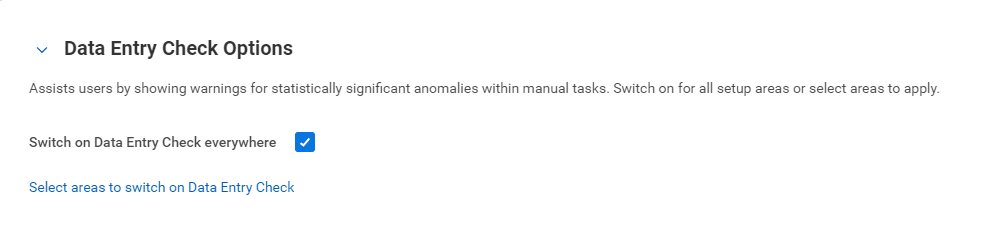
Data Entry Check in Compensation Review
Workday® 2024 R2 delivers a new option to the Compensation section of the Edit Tenant Setup – HCM task: Data Entry Check Options. If enabled, Workday uses Machine Learning Data Entry Check (DEC) functionality for validating manual entries of compensation review data.
For compensation review, these are editable, numeric fields in the configurable grid. When selected, Workday uses machine learning on successfully completed compensation review events to validate the data you enter in the selected fields. If the numeric value you enter is outside historical amounts, Workday presents an ignorable validation message. Statistical outliers are determined based off historical entries.
Setup Required :- Automatically Available
Total Value Matrix Web Services
Workday® 2024 R2 updates the Get Compensation Matrices and Put Compensation Matrices web services. We add the new Total Value Compensation Matrix section, and these new columns:
- Amount
- Calculation
- Default Currency
- Percent
- Weighted
Setup Required :- Automatically Available
Validation Rules for Custom Calculations
Workday® 2024 R2 enables validations to evaluate real time edits to these custom calculation fields in the compensation review grid:
- Custom Calculation Bonus Currency
- Custom Calculation Bonus List Value
- Custom Calculation Bonus Numeric
- Custom Calculation Bonus Percent
- Custom Calculation Merit List Value
- Custom Calculation Merit Currency
- Custom Calculation Merit Numeric
- Custom Calculation Merit Percent
- Custom Calculation Promotion List Value
- Custom Calculation Stock List Value
- Custom Calculation Stock Currency
- Custom Calculation Stock Numeric
- Custom Calculation Stock Percent Workday validates your entry when you navigate out of the field.
Setup Required :- Automatically Available
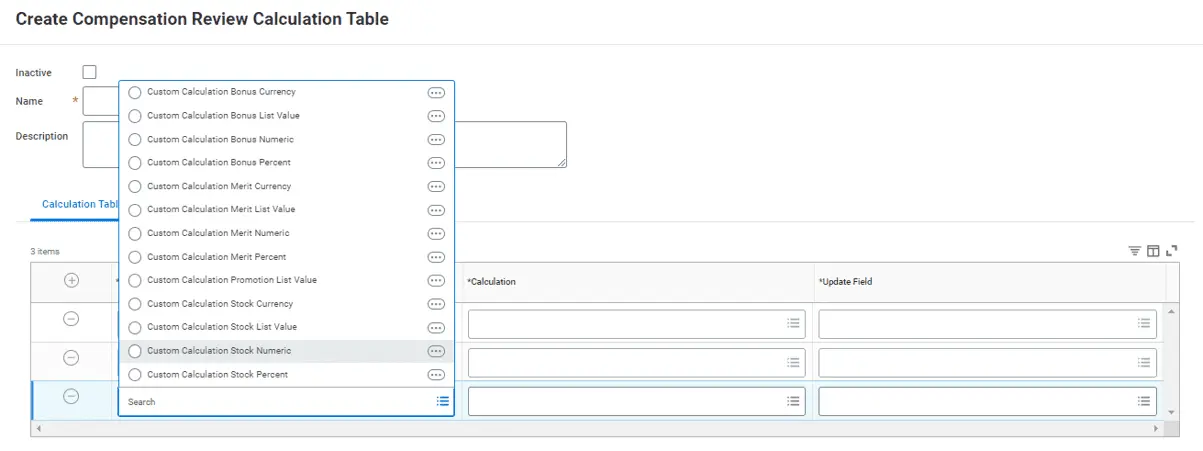
Stock Award Custom Calculations in Workday® 2024 R2
Workday® 2024 R2 updates the Create and Edit Compensation Review Calculation Table tasks. You can now select these new fields from the Input prompt:
- Custom Calculation Stock Currency
- Custom Calculation Stock Numeric
- Custom Calculation Stock Percent
- You can then add these same field to your grid configuration.
Stock Award Custom Calculations in Workday® 2024 R2 (Stock, Merit and Bonus Reporting)
Workday® 2024 R2 delivers these new report fields on the Stock Plan Award and Stock Plan Award Audit business objects (secured to the Public Reporting Items domain), and on the Compensation Review Stock Plan Award Audit report:
- Custom Calculation Stock Currency
- Custom Calculation Stock Numeric
- Custom Calculation Stock Percent
- Stock Amount Awarded
Workday 2024R2 delivers these new fields on the Compensation Review Merit Award Audit report:
- Custom Calculation Merit Currency
- Custom Calculation Merit Numeric
- Custom Calculation Merit Percent
We also deliver these new fields on the Compensation Review Bonus Payment Audit report:
- Custom Calculation Bonus Currency
- Custom Calculation Bonus Numeric
- Custom Calculation Bonus Percent
Setup Required :- Yes
HCM
Change Job Templates New User Experience in Workday® 2024 R2
- This Workday® 2024 R2 update streamlines the Change Job experience for users and provides consistency through new page layouts. An allows your organization to work more effectively and quickly through the Change Job process.
- Workday provide the ability to leverage the simplified user interface for review and approval steps, enabling you to seamlessly make changes across more scenarios.
- New layouts for the following Change Job actions:
- Review Change Job
- Approve
- Event Details
- Cancel and Rescind
- ‘Make Changes’ button on editable review steps to update items
- The new experience is automatically available on review steps for any change job template that has the Enable Enhanced User Interface checkbox selected.n
Setup Required :- Automatically Available
Job Profile User Interface
With this release, Workday® 2024 R2 updates the job profile user interface and enhances several job profile fields. This update improves the user experience for maintaining job profiles, making it easier for you to add all required data by grouping fields in a more logical order, emphasizing skills, and displaying reference information in one location.
Setup Required :- Automatically Available
Consolidated Hire Business Process
Streamlines the Hire process by consolidating business processes necessary to complete an employee hire. The decrease in manual effort provides more efficiency and ease of process.
Payment elections can also be added for a worker during the hiring processwhich helps to reduce administrative workload and the likelihood of payment delays.
The following subprocesses can now be added to the consolidated template for Review and Approval for the Hire Business Process:
- Assign Employee Collective Agreement
- Assign Pay Group
- Change Organization Assignments for Worker
- Edit Government IDs
- Edit Service Dates
- Payment Election Enrollment Event
- Service Date Changes
Setup Required :- Automatically Available
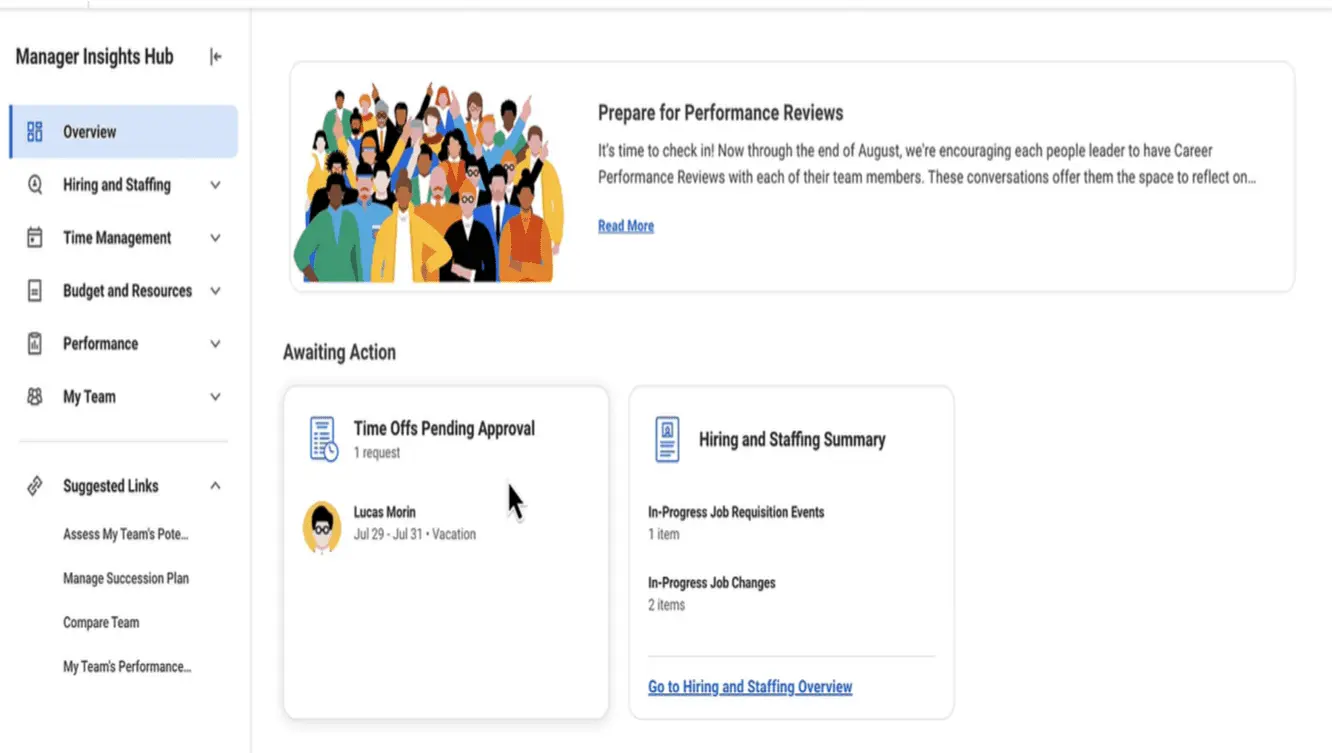
Manager Insights Hub in Workday® 2024 R2
It is a huge tool to help Managers navigate their many tasks and to-dos while keeping track of their team members. This enhancement will surely increase efficiency and timeliness across the board.
Workday also enable the hub for additional solutions and functional areas within Core HCM, including Staffing, Core Compensation, and Time Off and Leave. This is in addition to the existing functionality within Talent Optimization and Peakon.
This consolidates many manager tasks and reports in one central location, enabling managers to easily support their team.
Manager Insights Hub Sections:
- Overview
- Hiring and Staffing
- Time Management
- Budget and Resources
- Performance
- My Team
Setup Required :- Yes
INTEGRATIONS
Workday Query Language (WQL) Enhancement for "Do Not Use" Fields
Workday® 2024 R2 has updated its Workday Query Language (WQL) to allow continued use of report fields marked as “Do Not Use” until they are officially retired. This enhancement provides more flexibility in how users can export data, ensuring that existing queries remain functional. However, Workday recommends not adding these fields to new or updated queries to avoid future issues. This feature is automatically available with no additional setup required.
Setup Required :- Automatically Available
Submit Supplier Web Services Updates
- This update introduces a new validation feature for supplier web services to enhance security. Specifically, it adds a validation for “Business Entity Contact: Supplier Contact valid for Supplier” across all versions of the following web services:
- Submit Supplier
- Submit Remit To Supplier Connection
- The purpose of this validation is to ensure that supplier contact information is accurate and authorized, thereby improving the security of supplier-related transactions. This feature is automatically available and requires no additional setup.
Setup Required :- Automatically Available
Purge Pre-Hire Data
- Workday® 2024 R2 has introduced to manage and purge pre-hire data. This update helps to enhance data management by providing flexibility in handling information for individuals who do not transition into active candidates, students, or employees.
- Conditions for Purging Data:
Pre-hire data can only be purged if:
- The pre-hire was created as a standalone pre-hire.
- There are no active, terminated, or former worker, student, or candidate records associated with the pre-hire.
- The pre-hire does not have any complete or in-progress hire events.
- There are no incomplete events related to the pre-hire.
Setup Required :- Automatically Available
Handle Import Processing Errors Header for Web Services
Overview:
Workday has introduced a new x-handle-import-process-errors HTTP header specifically for Import web services. This feature allows users to handle processing exceptions, including those related to custom validations, directly within their SOAP Import web service calls.
Setting the Header to Handle Exceptions:
- When the header is set as x-handle-import-process-errors=1 (true), the Import web service will handle exceptions using the new error handling process.
- For Workday web service versions 43.0 and higher, this setting is enabled by default.
Disabling the Header:
- Setting the header to x-handle-import-process-errors=0 (false) disables this new exception handling feature.
- For versions below 43.0, the header defaults to false, meaning the new processing method is not used unless explicitly configured.
Performance Impact:
- Using this header to handle exceptions might slow down the web service’s operation. This is because the system now processes additional steps to handle and log exceptions.
Scope of the Update:
- This feature applies only to Import web services. Bulk Import web services already automatically use the processing provided by this new header.
Setup Required :- Automatically Available
Ceridian Check Print Service Integration
Overview:
Workdays continue to enhance the Ceridian Check Print Service integration. These enhancements improve the performance and flexibility of the Ceridian Check Print Service integration.
Functionality :
To help ensure authorized access for documents, we now secure the WPN – Ceridian Check Printing integration template to the Domain Process: Payroll Settlement domain in addition to its existing domains.
Setup Required :- Automatically Available
Pre-2016 Layout for SAT Tests (Education Tests)
Overview:
Workday continue to enhance functionality for education tests to support new and updated test layouts.
Template – SAT Education Test Result Inbound
Update-> Input File Layout
Functionality:
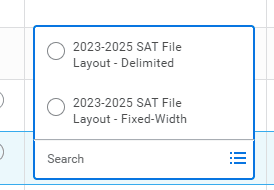
Workday® 2024 R2 update the Input File Layout integration attribute on the SAT Education Test Result Inbound integration template to remove the Pre-2016 SAT fixed width option, as the College Board is no longer using data layouts from before 2016. You can continue to import Pre-2016 SAT scores using the layout options for the current and previous years.
Setup Required :- Automatically Available
HMRC RTI Special Characters
Overview:
Workday now enable you to submit accented or special characters, in a worker’s address, in a Full Payment Submission (FPS) file to HMRC. This saves you time instead of having to manually amend any special characters, and reduces the chance of HMRC rejecting your submission.
Functionality :
If you enter an accented or special character in these fields, on the Worker and Partner objects, Workday converts it to a character that HMRC accepts:
- Home Address Line 1
- Home Address Line 2
- Home Address Line 3
- Home Address Line 4
Setup Required :- Automatically Available
Get Taxable Document for Tax Calculation Web Service
Overview:
Workday update the Get Taxable Document for Tax Calculation web service with new fields to support third party tax calculation enhancements. These new fields include help you to perform tax calculations and comply with regulations.
Functionality :
We update the Get Taxable Document for Tax Calculation web service to include address and country level tax IDs and statuses.
Setup Required :- Automatically Available
Bank Account Transfer for Settlement Functionality
Overview:
Workday enhances bank account transfer for settlement functionality to now accurately provide beneficiary company bank address and tax id in payment files. This enhancement provides additional data that you may require for bank account transfer for settlement wire and other electronic payments.
Functionality :
Workday now includes the beneficiary company bank address and tax id in payment files generated through these Workday-delivered integration templates and web services:
- Core Connector: Payments V2 Outbound template
- WPN – ISO 20022 V3 (Enhanced Performance) template
- Get Payments web service
- Get Payment Messages web service
Workday® 2024 R2 also now include only the tax ID in payments generated from the WPN – ISO 20022 V2 Direct Debit (Enhanced Performance) integration template.
Setup Required :- Automatically Available
Business Objects on the Data Sources REST API
Overview:
The Workday Query Language v1 REST API for Data Sources has been updated to include primary and related business objects in its responses. This change helps users better understand the connections between data sources, fields, and the business objects they relate to.
Primary Business Objects:
- The endpoints for listing and accessing specific data sources now return the primary business object associated with each data source.
Endpoints :
- GET /dataSources
- GET /dataSources/{ID}
Related Business Objects:
- The endpoints that filters within a data source now return the related business object for each field or filter.
Endpoints :
- GET /dataSources/{ID}/fields
- GET /dataSources/{ID}/dataSourceFilters/{subresourceID}
Setup Required :- Automatically Available
Flex Teams Web Services in Workday® 2024 R2
Overview:
With this update, Workday deliver and make multiple flex teams web services public. These web services support creating, editing, retrieving, and importing both advanced and simple flex teams attributes.
Note: You might need to take additional steps to enable this feature depending on your organization’s subscription service agreement.
The Manage Flex Team web service enables you more easily import and export data, facilitating the rapid creation and editing of flex teams, accelerating the uptake and use of the feature.
Functionality :
Workday deliver and make the following web services public:
- Manage Flex Team
- Get Flex Teams
- Get Flex Team Availabilities
- Get Flex Team Categories
- Get Flex Team Types
- Put Flex Team Availability
- Put Flex Team Category
- Put Flex Team Type
Workday add a new initiating action on the Manage Flex Team business process security policy, Manage Flex Team (Web Service).
Setup Required :- YES
Level of Effort :-
Multicompany Accounting Journals with Multiple Ledger and Transaction Currencies
Overview:
Workday continues to improve the Import Accounting Journal web service and now enables you to create multicompany accounting journals with multiple ledger and transaction currencies where the line company amounts self balance by company. This functionality reduces the need to manually create and approve multiple journals with separate transaction currencies.
Functionality :
Workday has updated the Import Accounting Journal web service, removing previous limits. You can now create and submit journals with multiple transaction currencies and line companies using different ledger currencies as long as:
- The journal line amounts balance by company.
- The “No Intercompany Payable/Receivable Lines when Journals Self Balance by Company” option is selected in the Edit Tenant Setup – Financials task.
Note: If suspense accounting is set up, it won’t apply to unbalanced multicompany journals with multiple ledger and transaction currencies.
Setup Required :- YES
Level of Effort :-
New Fields in UBL 2.1 Electronic Invoice Connector in Workday® 2024 R2
Overview:
This update introduces additional optional fields for the UBL 2.1 Electronic Invoice Connector, allowing for the extraction of more detailed customer invoice information. That is particularly for Tier-1 countries, thereby reducing invoicing costs by automating the data collection process.
New Integration Maps:
- Allows mapping of Company and Customer Tax IDs to external values as schemeID or target output fields in the UBL 2.1 XML file.
- Example: Mapping internal values like FRA-SIREN to an external value (e.g., 0009) for customer tax identification.
Additional Address Concatenation:
- A new attribute enables the inclusion of additional address lines (3-9) in a single line in the UBL output file.
New Integration Field Attributes:
- Fields to capture details such as project references, invoice numbers, start and end dates, external document locations, and buyer and seller identifiers.
- Includes payment account identifiers like bank account number, IBAN, and direct debit mandate references.
National Tax ID Code Reporting:
- Introduces a new report field for National Tax ID Code to be used in custom reports, ensuring compliance and accurate data representation.
Setup Required :- YES
Level of Effort :-
Organization Goals Web Services Label Change
Overview:
With this release, we rename the Supports Reference field to Organization Alignment Reference in the Get Organization Goals and Put Organization Goals web services. Provides a consistent experience with the user interface.
Functionality :
We update the Supports Reference field to Organization Alignment Reference for the Get Organization Goals and Put Organization Goals web services.
Setup Required :- YES
Level of Effort :-
Payroll Partner Payment Outbound Integration
Overview:
Workday enables you to more easily share historical payroll data about employment verification, unemployment claims, and tax credits with your third-party payroll vendor. This integration helps improve efficiency and reduce manual labor.
Functionality :
Workday add a new Payroll Partner Payment Outbound integration template. You can use this integration to:
- Extract up to 3 years of payroll data and use it to create an output payment file.
- Configure the payroll data that you extract to comply with your third-party payroll vendor’s specifications
Key Features:
- Extract up to 3 years of payroll data to create an output payment file.
- Configure payroll data to meet your third-party payroll vendor’s specifications.
Setup Required :- YES
Level of Effort :-
Supplier Sales Order Number and Shipping Method for Purchase Order Processing with EDI 850
Overview:
With this release, Workday enables you to issue purchase orders with supplier sales order numbers if you have procedure information enabled when using EDI 850 to reduce work for bill-only and consignment orders. You can now also include the shipping method when issuing purchase orders with EDI 850 to ensure rush orders are processed correctly. This increases support for issuing purchase orders with EDI 850 for bill-only, consignment, and rush orders while reducing user error from manual data entry and increasing visibility of key information in your purchase orders.
Functionality :
Workday update these items by adding a new EDI Code field that you can use to specify a shipping method:
- Maintain Shipping Information task
- View Shipping Information report
Workday also adds the new EDI Code field to these web services:
- Get Shipping Methods
- Put Shipping Method
We also update these procurement web services by adding the new Supplier Sales Order Number field, so that you can view or edit the supplier sales order number:
- Get Purchase Orders
- Get Purchase Order Change Orders
- Get Requisitions
- Submit Purchase Order Change Order
- Submit Purchase Order
- Submit Requisition
By default, Workday hides the Supplier Sales Order Number field.
Setup Required :- YES
Level of Effort :-
PAYROLL
Add Payroll Input on Payroll Results in Workday® 2024 R2
Feature:
Workday® 2024 R2 update adds a new button on the payroll results screen that provides access to a new, simplified task to add payroll input, saving you time and effort. We make the layout of this task more intuitive, which helps you complete the task more quickly and reduces the likelihood of errors.
Changes:
Workday add a new Add Payroll Input button on the worker payroll results screen, enabling you to:
- Access the new Add Payroll Input task directly on a worker’s payroll result instead of using related actions.
- Add payroll inputs to results in any status..
Setup Required :- Automatically Available
Custom Validation for On-Demand Payments
Feature:
With this release, you can configure custom validations for on-demand payments.Provides you with better support and flexibility to configure and maintain custom validation rules for on-demand payments.
Changes:
You can now include rules (Example: Payment date has to be equal or greater than the current date) when you create custom validations for on-demand payments using the Maintain Custom Validations task.
To provide better clarity, we rename the Off-Cycle Payment category to On Demand Payment.
Setup Required :- Automatically Available
Global Payroll Connect Enhancements
Feature:
Manage global payroll processing across the globe by reviewing in near real-time global payroll related information with a single view from multiple payroll vendors.
Note: We plan to deliver new functional area, product, and Core Data Management tags for this functional area in a future update. You may notice discrepancies in the tags and functional area fields of the Release Center and the What’s New in Workday report for this feature.
With Global Payroll Connect features, you can:
- Configure earnings, deductions, and basic payroll processing information
- Set up integrations or APIs that send worker data, such as hire, compensation, benefits, time off and termination events to third-party payroll vendors.
- Receive data from third-party payroll vendors, such as external payroll results, external payslips, tax documents, and other payroll documents via APIs.
- Create and maintain payroll processing checklists.
- Reconcile data between Workday and third-party payroll vendors. Leverage analytics or create and manage custom reports to assist in analysing and auditing payroll data’s
Changes:
Workday deliver a new Global Payroll Connect functional area for these Global Payroll Connect domains and all Cloud Connect for Third Party Payroll domains:
- Manage: Data Changes on Demand
- Manage: Global Payroll Processing
- Manage: Global Payroll Inbound Notifications
- Manage: Global Payroll Processing
- Reports: Data Changes on Demand Results
- Self-Service: Payroll Interface (Additional Payroll Data)
- Worker Data: Payroll Interface (Additional Payroll Data)
- View: Global Payroll Hub
We update the Alight Solutions external payroll vendor option name to Strada Global on these tasks:
- Create External Payroll Vendor Mapping
- Edit External Payroll Vendor Mapping
- View External Payroll Vendor Mapping
Setup Required :- Automatically Available
My Tasks Notifications for Event-Driven Integration for Third-Party Payroll Integration Service
Feature:
With this release, Workday improves layout of My Task notifications for the Event-Driven Integration for Third-Party Payroll Integration Service.
To improve any error handling, Workday displays the HTML error code in notifications when applicable.
Changes:
You may see slight changes in the notifications user interface.
Setup Required :- Automatically Available
Object Transporter for Payroll
Feature:
In this release, Workday deliver Payroll to the new Object Transporter. This update improves your ability to migrate Payroll configuration data and objects from one tenant to another, either individually or as part of a configuration package.
With this update, Workday enables you to migrate these Payroll objects between tenants using the new Object Transporter:
• Aggregate Calculations
• Arithmetic Calculations
• Advanced Lookup Tables
• Balance Periods
• Build Date Calculations
• Conditional Calculations
• Constant Date Calculations
• Constant Value Calculations
• Date Difference Calculations
• Date Extract Calculations
• Date Increment/Decrement Calculations
• Deductions
• Earnings
• Gross-Up Configuration
• Gross-Up Priorities
• Input Value Lookup Tables
• Instant Set Comparison Calculations
• Instance Value Calculations
• Logic Calculations
• Lookup Calculations
• Lookup Tables
• Maintain Audit Configuration – Results by Period
• Maintain Payroll Audit Configurations – Compare Periods
• Maintain Payroll Proration Overrides
Pay Accumulations
• Payroll Action Reason
• Payroll Audit Configurations
• Payroll Audit Run Group
• Payroll Audit Worker Eligibilities
• Pay Balances
• Pay Group Automatic Assignment Rules
• Pay Group Rules
• Payroll Input Templates
• Payroll Proration Overrides
• Payroll Prism Prove Mappings
• Pay Results CRF Mappings
• Pay Results CRF Mappings – Balance Period Mappings
• Pay Retro Calculation Processing Configurations
• Pay Run Groups
• Payroll Register by Period Configurations
• Payroll Register Task Configurations
• Related Calculations
• Step-Based Calculations
• Step-Based Calculation Condition
• Step-Based Condition Groups
• Value Comparison Calculations
• Voluntary Deduction Configuration
What to know about migrating Payroll objects
- You can’t migrate snapshots later than today’s date, only the most recent snapshot that is today’s date or earlier.
- You can only migrate a pay component with a package effective date that is later than the earliest snapshot date.
- You must migrate pay component related calculations either before you migrate or as you migrate generic calculations.
- You must migrate pay component related calculations name changes before you migrate the pay component or as part of a configuration package that includes that generic calculation.
When you remove optional values in your calculations, then migrate those objects to a new tenant where that value already exists, the empty value doesn’t migrate. Workday recommends you wait to remove the optional values until after you migrate to the new tenant.
Setup Required :- Automatically Available
Payroll Calculation Processing Report
Feature:
With this release, we now process history payments when you run the Payroll Calculation Processing Report. Makes it easier for you to view and take action on history payment results.
Changes
Setup Required :- Automatically Available
Payroll Processing in Workday® 2024 R2
Feature:
Workday® 2024 R2 enhances and consolidates payroll processing. Reduces the time you spend calculating, auditing, and reconciling payroll results.
Changes
Workday enhances the performance of the Run Pay Calculation task. You might notice improved performance when you:
- Have a large number of terminated workers in your tenant.
- Run a pay calculation for a small number of workers with any option selected for Employees to Calculate and for pay group details configured with any of these payroll processing statuses: • Terminated with One-time Compensation Payments
- Terminated with One-time Payroll Inputs
- Terminated with One-time Payroll Input for Earnings
- Terminated with Ongoing Payroll Input
- Terminated with Retro Differences
With this release, Workday improves general performance. You may experience improved performance when using these tasks:
- Delete by Batch ID
- Delete External Payroll Input by Batch
Also, when you recalculate a payroll result using these methods:
- Manual
- On-Demand
- Regular
Setup Required :- Automatically Available
Retro Transaction Types for Payroll for Canada
Feature:
With this release, Workday support payroll retro transaction types for Payroll for Canada that were previously unsupported events. Retro events associated with the End Additional Job, Pay Group Change, and Tax Authority events now process as supported retro events.
You can now calculate retroactive payroll for pay periods that contain these transaction types, reducing the need for manual calculations and pay input.
Changes
We remove these transaction types from the All Unsupported Payroll Retro Transaction Types report and add them to the All Supported Payroll Retro Transaction Types report:
- Retro End Additional Job
- Retro Pay Group Change
- Retro Tax Authority Change
Workday now processes retro events associated with these transaction types as supported retro events.
Example: For Payroll for Canada, Retro Tax Authority doesn’t recalculate taxes under separate tax authorities. Workday calculates taxes using the primary pay group and reconciles taxes with the primary pay group current tax authority.
Setup Required :- Automatically Available
TALENT & PERFORMANCE
Employee Reviews Started Field on the View Employee Review Template Report
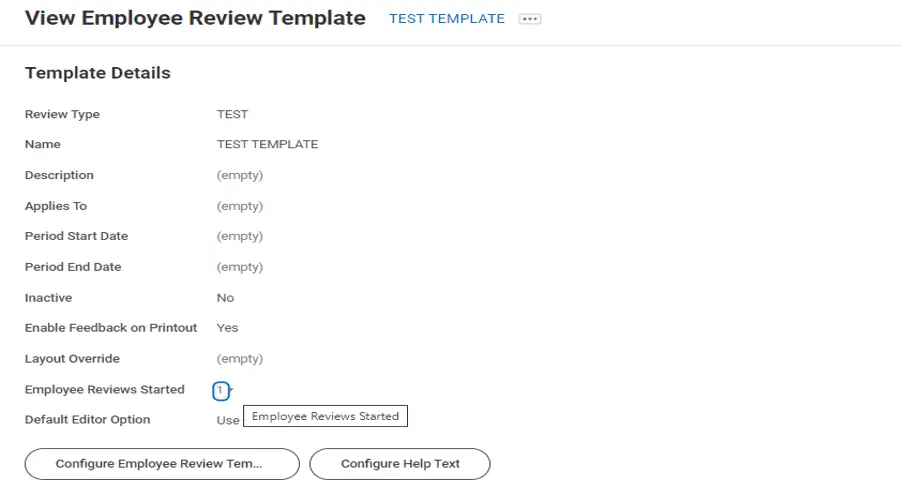
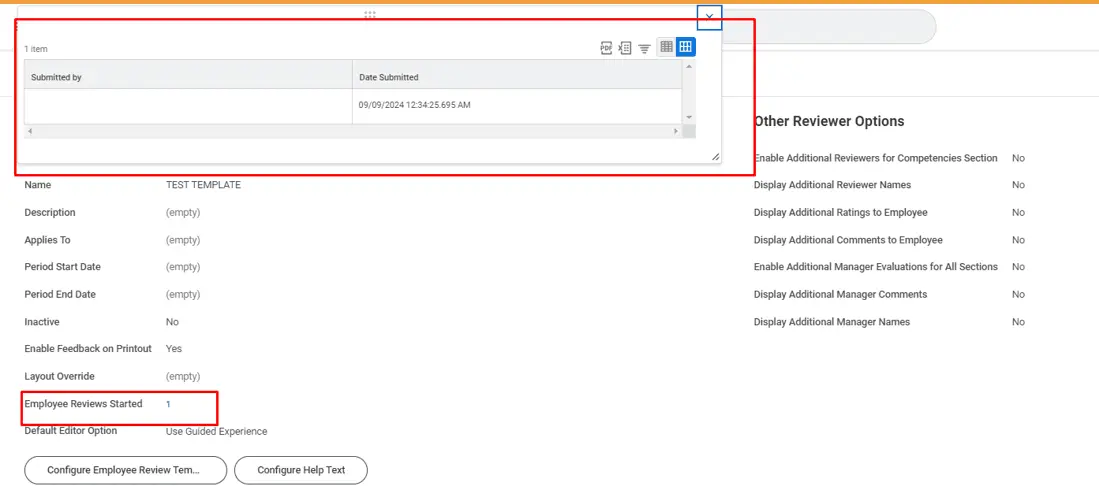
With this release, when viewing an employee review template using the View Employee Review Template report, we replace the drill-down in the Employee Reviews Started field to display a count of the number of reviews that use the template.
Reduces loading time for the View Employee Review Template report.
Setup Required :- Automatically Available
Feedback Received User Experience in Manager Insights Hub
Workday® 2024 R2 enhances the manager feedback received experience in Manager Insights Hub. They provide a new user interface to view requested feedback and anytime given feedback by enabling the card format. Also, improved the look and navigation of feedback received.
We increase readability and navigation for managers reviewing feedback received events for their direct reports.
Setup Required :- Automatically Available
Suggested Skills for Workers
Workday® 2024 R2 improves its methodology for generating skill suggestions to workers by leveraging explicit skill data to supplement existing machine learning-generated skill suggestions.
This can:
- Increase the quantity and quality of skills on worker profiles, facilitating better career insight and mobility.
- Reduce friction and increase user confidence with Skills Cloud.
Setup Required :- Automatically Available
Goals User Experience Redesign Multi-Management of Goals
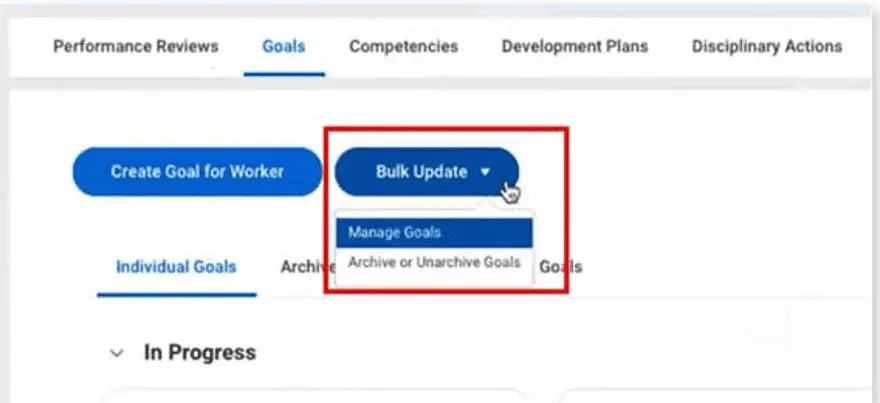
With this Workday® 2024 R2 update, it increases the efficiency by enabling workers and managers to update multiple goals at once.
- Ability to create, delete, edit, review, and approve multiple goals at once
- Adding the Employee As Self and Manager security groups to the new Individual Goals initiating action on the Manage Goals business process security policy will allow workers and managers to update multiple goals at the same time.
This button provides a drop-down to access Manage Goals and Archive or Unarchive Goals tasks on these reports:
- My Goals
- View Goals
- View Goals for Worker on the worker profile
Setup Required :- Automatically Available
Skill Assessments
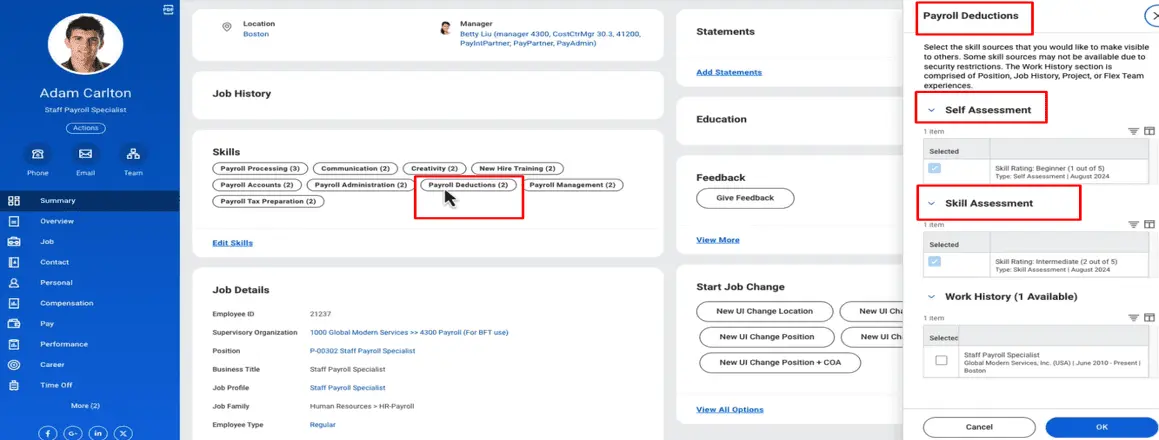
Workday is now supporting structured skills assessments by enabling assessors to rate worker profile skills, job profile skills and all other skills of a worker.
NOTE: You need Skills Cloud enabled to use this feature.
- Enables structured skill assessments for workers, secured to the Worker Profile and Skills functional area
- Managers and assessors can rate job profile skills, worker profile skills and other skills on a 1-5 proficiency scale using Assess Skills Business Process
Setup Required :- Automatically Available
TIME TRACKING AND ABSENCE
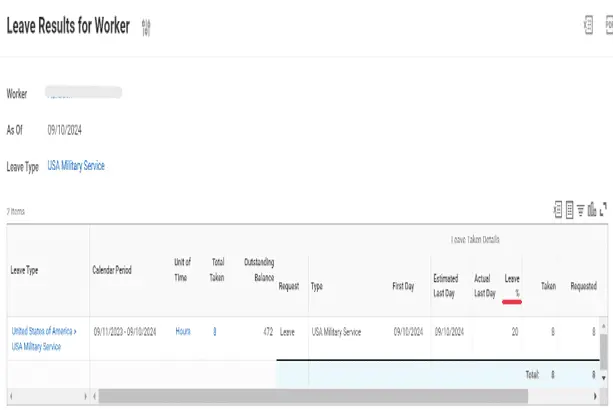
Leave Percentage in Leave Results Reports
We update these reports by displaying a Leave Percentage column when users enter values in the Leave Percentage additional field for any leave requests:
- Leave Results for Organization
- Leave Results for Worker
Setup Required :- Automatically Available
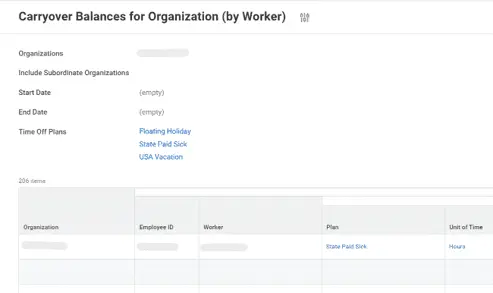
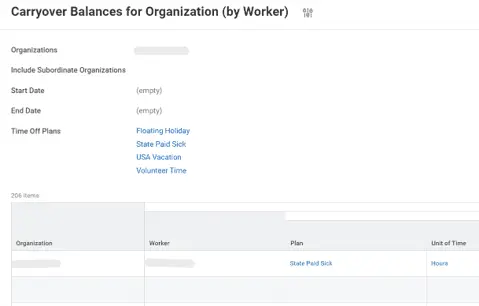
Employee ID in Carryover Reports
With this update, WD adds a new Employee ID column to these reports, making it easier to distinguish between workers with the same name:
- Carryover Balances for Organization (by Carryover Date)
- Carryover Balances for Organization (by Worker)
You can access these reports in global search or when you select Time and Absence as a related action on an organization.
In SBX Preview In SBX
Setup Required :- Automatically Available
Absence Reporting on Time Off Entry and Time Off Event Business Objects
- WD delivers these new report fields on the Time Off Entry business object (secured to the Public Reporting Items domain):
- Absence Threshold Status Indicator for Pending Time Off. This report field enables you to identify the threshold status of a time off entry for a pending time off event. The value depends on whether the absence threshold is met and which severity level you configure for the validation:
- Error: The absence threshold is met and the validation severity is critical.
- Valid: The absence threshold isn’t met.
- Warning: The absence threshold is met and the validation severity is warning.
- The value is blank for events that have an event status other than In Progress or when no absence thresholds apply.
- Corrected Time Off Quantity. This report field enables you to identify the time off units that the worker corrected in the time off event.
- Previously Requested Time Off Quantity. This report field enables you to identify the time off units that the worker previously requested in the time off event before it was corrected.
- We also deliver a new Absence Threshold Result report field on the Time Off Event business object (secured to the Public Reporting Items domain). This report field returns the Absence Threshold Result business object for a time off event, enabling you to access the report fields on the business object.
Setup Required :- Automatically Available
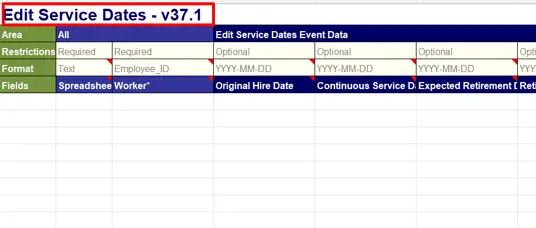
Edit Service Dates Web Services
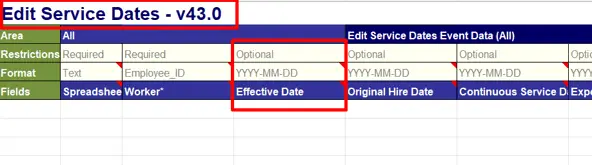
- Workday updates the Edit Service Dates web service to support the new Effective Date field.
In SBX Preview In SBX
Setup Required :- Automatically Available
Maximum Potential Carryover Report Field
- Workday delivers a new report field that enables you to view the maximum number of hours and days that an employee can carry over from one balance period to the next.
- Workday deliver a new report field on the Time Off Plan business object that enables you to view the maximum number of hours and days that an employee can carry over from one balance period to the next.
- The report field returns the greater of the numbers between the carryover limit and any applicable carryover overrides on the worker.
Setup Required :- Automatically Available
Accrual Expiration
Accrual Set Up
WD introduce a new section on the Time Off Plan Overrides tab of the accrual called Expiration Override. To setup accrual expiration, define:
- Amount of Time Before Expiration
- Unit of Time Before Expiration
You also have the option to select Include Prior Balance Period Accruals in Upper Limit Calculation. Select this if expiring accruals should be included in the time off plan balance upper limit calculations across balance periods.
Note: When requesting time off, Workday will exhaust the units with the soonest expiration date first.
New Calculation
WD also introduce a new instance value calculation (IVC), Approved Calculated Time for Day for Accrual. This calculation can be used on its own or within arithmetic calculations to accrue units from time tracking relative to the (calculated) day in which they are worked. It ignores accrual frequency method and causes the accrual to trigger on the day that the approved calculated time exists. To use this IVC, you must define an expiration on the accrual.
Maintain Accrual and Time Off Adjustments/Overrides.
You can now modify reference dates when processing adjustments for expiring accruals in the UI. The reference date selected will determine when that accrual adjustment is granted, regardless of the accrual frequency method defined.
Override Accrual Expiration
WD have created the new Maintain Accrual Expiration Overrides Task that allows you to override expiration rules defined on an accrual for a worker.
Reporting
WD have added a new column, Expiring Accruals Forfeited in Period, to all standard time off balance reports. This column will only appear if expiring accruals are configured for a time off plan.
Note: The existing Accrual Forfeited in Period/Year to Date fields will only reflect accrued time off forfeited in excess of an upper limit. Accruals that have expired will never be represented as part of this existing field.
The new self-service My Expiring Accruals report returns all accrual expiration events where the units to expire are greater than 0 as of today. By displaying accrual expiration details in one place, you can review expiration details and help inform your decision around the type of time off to take and ultimately take action (Request Absence) from a single page. This report can be accessed by search, worklet, or PEX Card.
Note: The Request Absence button will only appear for customers using the new Absence Calendar Experience.
WD have created a new PEX home card called Expiring Accruals. Once published, this will display on a worker’s homepage if they have upcoming accrual expiration events within the next 30 days with balances remaining as of the accrual expiration date. Selecting the Review button on the PEX card will open the My Expiring Accruals report. You also have the option to customize the title and subtitle of this card to meet the needs of your organization. The new Accrual Expiration Event business object links from worker and position business objects via the Expiring Accruals for Worker and Expiring Accruals for Position fields and allows reports to return:
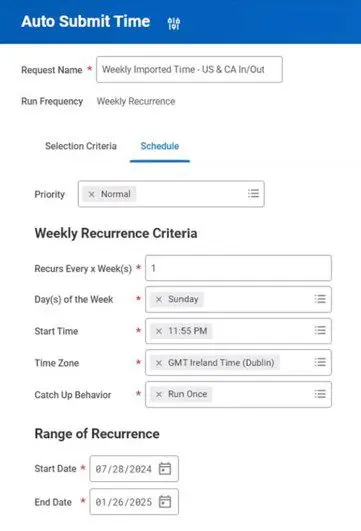
- This task provides additional flexibility to create auto-submit schedules for all time, all imported time, or imported time with the Auto Submit value set to true. WD also enable you to search for unsubmitted time for up to 365 days before or after the run date.
- Time Block Report Fields
- WD deliver these report fields secured to the Reports:
- Time Tracking domain: Time Block Last Submitted Date on the Time Block business object.
- Time Block Status on the Time Block (Coordinated) business object.
Setup Required :- YES
Automatically Submit Time
- Expiring Accrual
- Time Off Plan for Expiring Accrual
- Accrual Date
- Expiration Date
- Accrual Expiration Override
- Expiring Accrual Balance for Worker
- Expiring Accrual Balance for Position
- These report fields are secured so that they can be used in alert notifications. We have also added the Accrual Expiration Forfeited (for Time Off Plan) in Period as of Date report field to the Time Off Plan business object that returns the accrual expiration forfeited for all Accruals for the Time Off Plan for the period through the as of date.
Process: Auto Submit Time Domain
WD added a new Process: Auto Submit Time domain to enable time tracking administrators to automatically submit time for several users at once using a batch process.
Auto Submit Time Task
WD add a new Auto Submit Time task (secured to the Process: Auto Submit Time domain) to enable you to configure the frequency at which time will be automatically submitted so that you can have different settings for different time entry templates.
Reported Time Blocks for a Date Range Report
WD added a new standard Reported Time Blocks for a Date Range report (secured to the Reports: Time Tracking domain) enabling you to identify reported time blocks within a specific date range for better time submission for payroll processing and better time management of your teams.
WD also deliver a new data source filter that filters the All Time Blocks report data source to return reported time blocks within a specific date range.
Setup Required :- YES
Bulk Prorate Accruals
WD added a new Bulk Automated Accrual Adjustment service step that you can configure on these business processes after the completion step:
- Assign Employee Collective Agreement
- Change Job
- End Collective Agreement Assignment
When workers have collective agreement or change job events that impact their accrual entitlements, the Bulk Automated Accrual Adjustment service step updates the Bulk Absence Proration background job to prorate accruals for impacting events. The step creates automated adjustments in bulk for all eligible workers if the accrual is configured as:
- Based on As of Date (for mid-period accruals).
- Front-Loaded.
Setup Required :- YES
Enter Time by Period
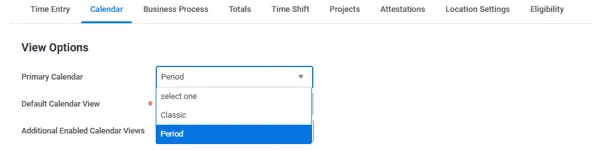
we enable workers and managers to use the period calendar as their primary time entry method.
Workers are now able to request an absence using the related actions on the time calendar.
This update will also view holiday information, period start/end date, payment date and incomplete check in/check out blocks.
Workday added an Include Scheduling Data check box to the Additional Options section. When you select Period or Classic from the Primary Calendar prompt, you can select Include Scheduling Data to include scheduling information on the period calendar.
We update these tasks:
- Create Time Entry Template
- Delete Time Entry Template
- Edit Time Entry Template
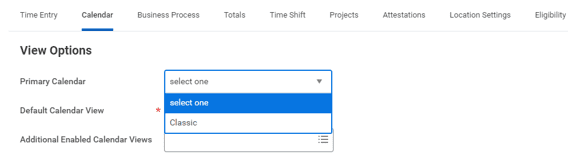
- For the Primary Calendar prompt, workday:
- Added a new Period option.
- We also update these reports:
- Enter My Time
- Enter Time for Worker
Setup Required :- YES
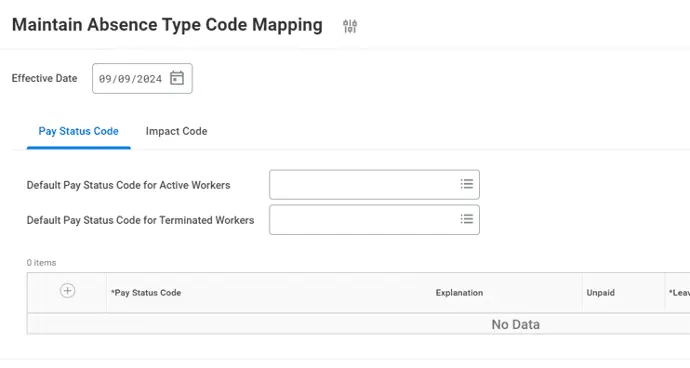
Pay Status Code on Absence Type Code Mapping
WD added the Pay Status Code tab on the Maintain Absence Type Code Mapping task.
REPORTING
Freeze report column
This feature gives end users more controls over how tabular report data displays. It also makes it easier to understand the context of data on reports that have many columns and require horizontal scrolling.
When end users run 1 of these custom or standard report types and select Grid Preferences, they can drag and drop columns to freeze on the report:
- Advanced
- Composite
- Simple
- Transposed
If the report doesn’t have columns eligible to freeze, Workday doesn’t display the Column Preferences menu to the report user.
Setup Required :- Automatically Available
Format Text Calculated Fields
Workday gives you more control over how your data displays by enabling you to remove or replace special characters and delimiters in text fields.
This feature simplifies editing text strings and reduces the number of calculated fields needed to do so.
Setup Required :- Automatically Available
Schedule Live Composite Reports
- Workday gives you more flexibility in how you view data for large composite reports by enabling you to schedule them to run in the background.
- This feature enables you to interact with report results directly in your browser instead of generating a CSV, Excel, or PDF output. Keeping the report results in Workday also makes your data more secure.
- Workday add the new View in Browser option to the Output Type section on the Output tab in the Schedule a Report task.
Setup Required :- Automatically Available
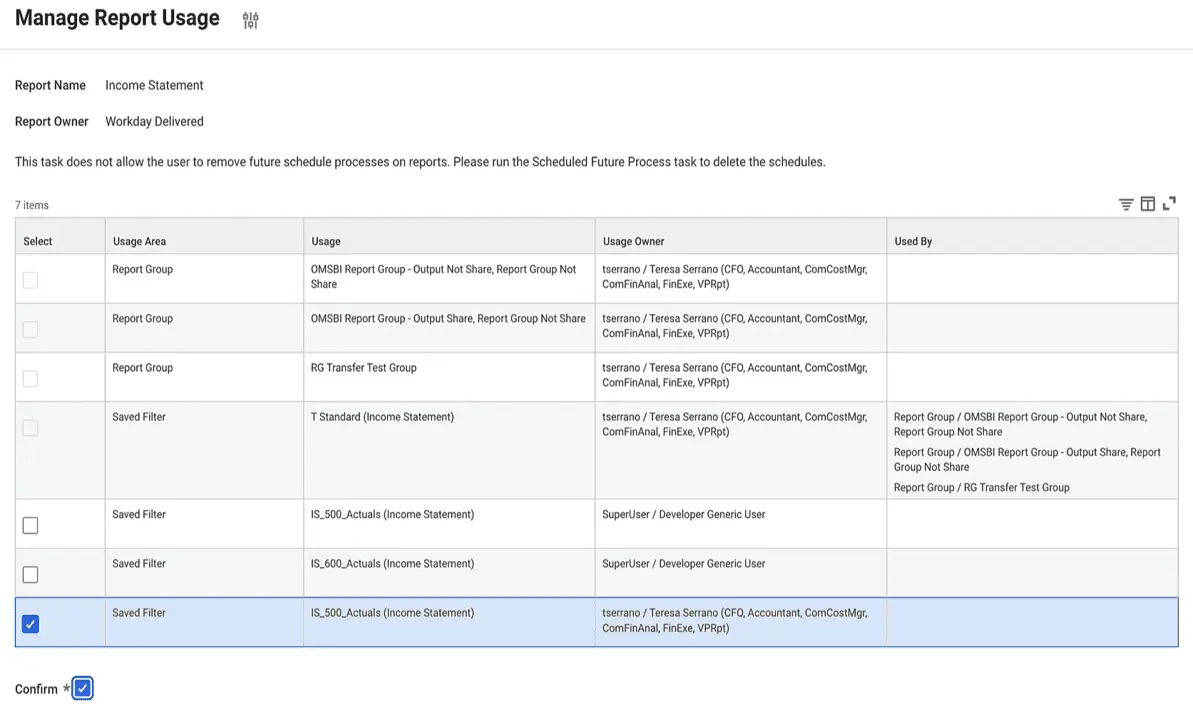
Maintain Report Usage for Saved Filters
- With this release, report administrators can use the Manage Report Usage task to remove saved filters owned by active users on a report.
- Report administrators can hide the Workday delivered reports that have saved filters owned by active users. This helps improve efficiency and productivity for report administrators.
- We have updated the Manage Report Usage task to enable Report administrators to delete saved filters owned by active users on a report.
Setup Required :- Automatically Available
BENEFITS
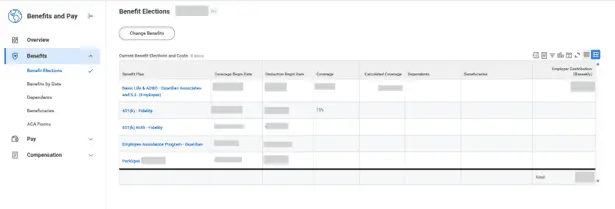
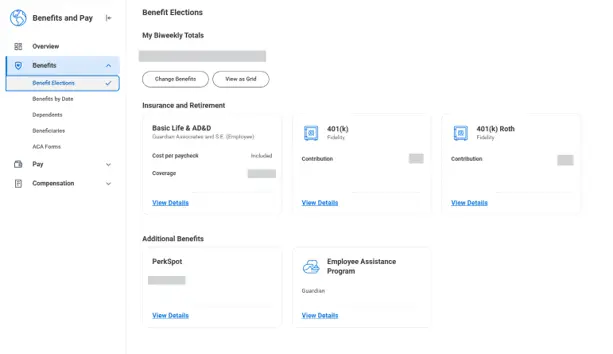
Benefit Elections User Experience Redesign
Workday transition the benefit enrollment landing page from the old card framework to the new card framework, and Current Elections summary from the grid view to the new card framework. This transition will affect your workers’ views of their benefit elections, but functionality remains the same.
The new cards framework provides a quick-glance view at a greater variety of information with a more organized experience for your employees when they’re managing their benefits.
Setup Required :- Automatically Available
SOAP Import Web Services for Benefits
Workday deliver new templates for Benefits import web services (SOAP) to improve importance. Workday has changed from a 2 tab spreadsheet to a 1 tab spreadsheet that users the Spreadsheet Key to coordinate the parent and child row information.
Setup Required :- Automatically Available
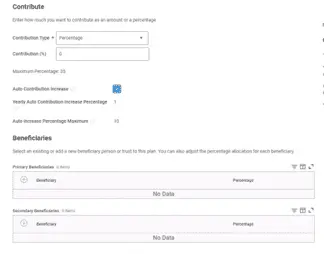
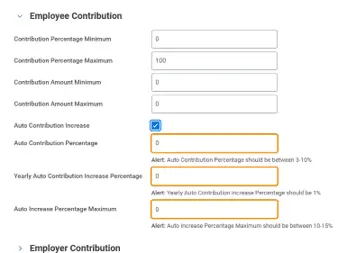
Auto Contribution Increase for Retirement Savings Plans - Secure Act 2.0
FEATURE
To support Secure Act 2.0, you can now enable workers to increase retirement savings contributions for workers that opt in to automatic contribution increases.
This feature is only available for percentage contributions. Employees can opt in or out of annual contribution increases during an enrollment event.
Setup Required :- YES
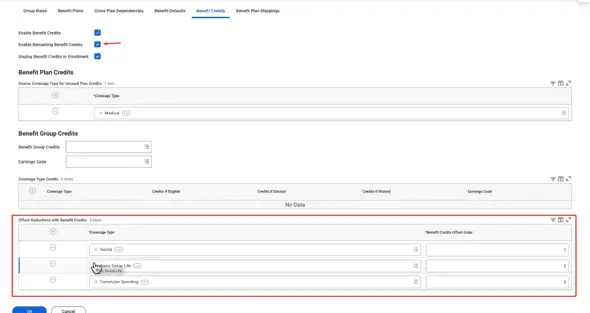
Benefit Credit Offsets for Unused Plan Credits
FEATURE
Workday enables you to set up offsets from unused plan credits, enabling employees to use leftover plan credits for the cost reductions associated with their benefit elections during an enrollment event.
Setup Required :- YES
Benefit Program Communication - Wallet
Overview:
Workday will deliver the ability to target program cards to workers that consolidate benefits information an employee might need on the go.
Changes:
Workday deliver these web services to support the future Wallet section of the Benefits and Pay Hub:
Get Wallet Opt In Preference: For future use.
Put Worker Benefit and Wellbeing Wallet Cards: For future use.
Setup Required :- YES
Benefit Credit Offsets for Unused Plan Credits
FEATURE
With this release, we deliver a new benefits messaging task, and an enhanced Open Enrollment reminders task, that both leverage Workday Notification Designer, and enable you to send workers emails, SMS, and push notifications related to their benefits and open enrollment.
Advantage:
It greatly enhances the notification creation experience for benefits administrators, boosts employee responsiveness, and helps to improve open enrollment participation rates.
Setup Required :- YES
Cloud Connect for Benefits: Benefits Connector V2
FEATURE
Workday delivers Benefits Connector V2, a generic Cloud Connect for Benefits (CCB) outbound integration.
Changes:
The CCB Benefits Connector V2 now generates an output file with worker benefit data, including enrollment, eligibility, and demographics. It uses DIS to extract data and identify changes, allowing you to send full files or just updates.
New features include:
- Separate data sections for each benefit plan type.
- Extensible fields for custom data.
- Expanded coverage for Health Savings Accounts and Additional Benefits.
Setup Required :- YES
Knowledge Base Articles for Benefit Plans
FEATURE
Workday enable you to link knowledge base articles to benefit plans using the Edit Benefit Plan task.
You can build a knowledge base about benefit plans to help workers find information without searching outside of Workday or opening a help ticket.
Setup Required :- YES
Open Enrollment Journey Enhancements
FEATURE
Workday enhance the Open Enrollment Journey template with a new task option.
Note: Journeys is a separate product (SKU) that requires a separate license.
Changes
Workday add the task Employee Benefits Open Enrollment Selection as a task you can enable as a step in Open Enrollment Journeys. As your employees complete your configured Open Enrollment Journey, they’ll now be able to access this task as a part of that Journey.
Setup Required :- YES
Worker Wellbeing Profile and Program Cards
FEATURE
Workday expand Worker Wellbeing so that you can tag benefit program cards with interests that you have configured. Workers can select the interests from their Wellness Interest Profile to view customized content.
Business Benefits
You can derive insight about which benefit program cards that you’ve tagged have the most engagement and improve the quality of your employee programs.
Setup Required :- YES
RECRUITING
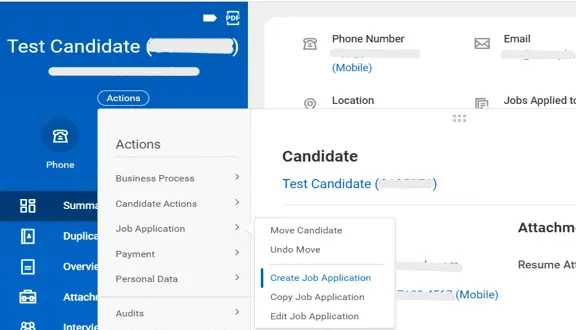
Copy Job Application Related Action
We can now copy a job application to another job requisition directly from a candidate’s profile or a job application by selecting Job Application > Copy Job Application from the related actions menu.
When you access the task from the related actions menu of the candidate’s profile, you can select a different job application to copy if the candidate has multiple applications.
Setup Required :- Automatically Available
Evergreen Requisitions for Copy Job Application
- Workday® 2024 R2 update the Copy to Another Job Requisition task to enable you to copy a job application to and from an evergreen requisition.
- WD also now display the Copy to Another Job Requisition action from the Candidate Job Applications grid for an evergreen requisition.
Setup Required :- Automatically Available
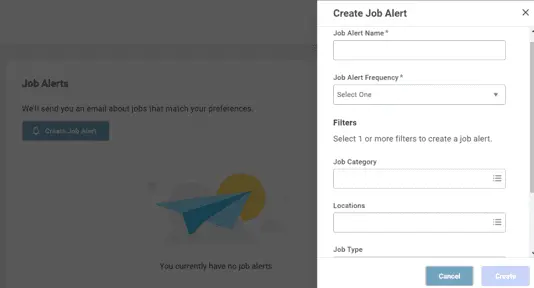
Candidate Home Job Alerts
- To improve the candidate experience, workday provide a more intuitive design for Job Alert tasks. A enable side panel has been enabled for Job Alerts when external candidates create and edit their job alerts within their Candidate Home.
- These tasks display on the right side of the page:
- Create Job Alert
- Edit Job Alert
- Workday update the Delete Job Alert task to display as a pop-up modal instead of a separate page.
Setup Required :- Automatically Available
Core Connector: Candidate Outbound
- Workday deliver these new integration services to the integration template that you can enable to specify the output location of an integration file and to enable a unique name for each output file for the integration:
- Core Connector: Candidate Outbound – Delivery Service
- Core Connector: Candidate Outbound Sequence Generator Service We deliver these field attributes that you can include in the output file:
- Located in Candidate/Job Application Data: Job Application Reference ID
- Located in Candidate/Job Application Data/Job Application Detail/Business Process Data • Job Application Step All Data
- Located in Candidate/Job Application Data/Job Application Detail/Business Process Data/Process History/Process: Comments
- Completed By
- Created On
- Process Name
- Status
- Step
- Workflow Step Security Groups
WD also add these launch parameters:
- As Of Effective Date
- Last Successful As Of Effective Date”
Setup Required :- Automatically Available
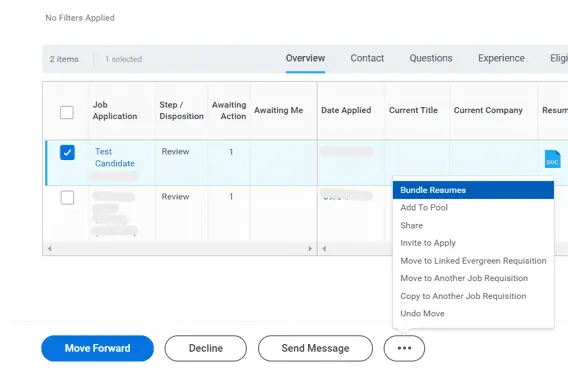
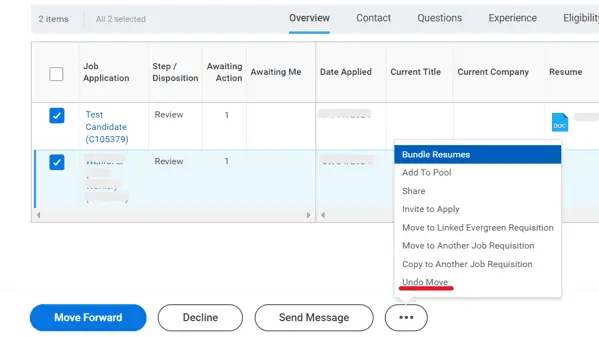
Undo Move for Multiple Candidates and Removed Resume Bundling Limit
- Workday deliver a new Mass Undo Move Job Application task (secured to the Undo Move Candidate domain) that you can use to return multiple candidates to their previous stage and step of the Job Application business process. You can access this task using with the new Undo Move action in the candidate list grid.
- With this update, we remove the limit on the number of resumes you can bundle at once.
Setup Required :- Automatically Available
Pre-Hire Collective Agreement Details Business Process
- Workday enable the Pre-Hire Collective Agreement Details business process to be a subprocess of these business processes to help specify collective agreements and factors when creating evergreen requisitions and job requisitions:
- Create Evergreen Requisition
- Create Job Requisition
- Edit Evergreen Requisition
- Edit Job Requisition
Setup Required :- YES
Job Description Generation on Job Requisitions
New Domain
Workday delivers a new Manage: Machine Learning for Job Descriptions domain (secured to the Staffing functional area) that you can use to secure access to tasks that use machine learning to generate job descriptions on job requisitions.
Generate with AI button
A new Generate with AI button has been added on the Job Description field on these tasks, which you can use to create job descriptions using generative artificial intelligence:
- Create Job Requisition
- Edit Job Requisition
- Create Evergreen Requisition
- Edit Evergreen Requisition
- Create Confidential Requisition
- Edit Confidential Requisition
Job Description Generation on Job Requisitions Innovation Services
WD update the Maintain Innovation Services Data Selection Opt-In task and add the Job Description Generation on Job Requisitions option to the
Job Requisition Data category on the ML for Recruiting section.
You must select the Opt In check box to contribute data to the machine learning data categories that we use for Job Description Generation on Job Requisitions.
Setup Required :- YES
U.S. Federal Veteran’s Preference
Veteran’s Preference for External Career Sites
WD deliver these new options that you can add to the Field column of the Personal Information – U.S. grid under the Apply – Personal Information (U.S.) section on the Create External Career Site and Edit External Career Site tasks:
- Veteran’s Preference
- Veteran’s Preference Attachments
When you configure these fields, candidates applying to a U.S.-based position can claim their veteran’s preference and upload up to 5 supporting documents on the Voluntary Disclosures page of their application.
Adjudicate Candidate Information
WD deliver a new Adjudicate Active Candidate Information report (secured to the new Process: Adjudicate Candidate Information domain) that adjudicators can use to determine the merit of the candidates’ claimed veteran’s preferences. Adjudicators can select the adjudicated veteran’s preference type and the adjudication status on the report.
WD add a new Adjudication section and Job Application Adjudication Grid prompt to the Maintain Candidate List Assignment task that you can use to assign a custom grid. This custom grid displays on the new Adjudicate Active Candidate Information report. You can create an adjudication grid by selecting the new Job Application Adjudication option on the What type of grid do you want to create? prompt of the Create Grid Configuration task.
WD recommend that your grid configuration includes an Adjudication Information column group with editable Adjudication Status and Adjudicated Veteran’s Preference Type fields, as well as these new report fields on the Job Applications, Prospects and Referrals business object (secured to the new Candidate Data: Veterans Preference domain):
Claimed Veteran’s Preference Type
Veteran’s Preference Attachments
Report Fields
WD also deliver these report fields on the same business object that you can use on the candidate list grid and candidate rating or ranking templates:
Adjudicated Veteran’s Preference Type (secured to the new Candidate Data: Veterans Preference domain)
Last Adjudicated Date (secured to the Candidate Data: Job Application domain)
Setup Required :- YES